Luminar User Guide
Luminar User Guide
Removing an Object
The process of making a photo look better is often referred to as retouching (while repairing
damaged photos is referred to as restoration). Luminar offers a useful tools to make these kind
of tasks easier. Let’s explore how the tool works.
Using the Clone & Stamp Tool
The Clone & Stamp tool works by replacing unwanted or damaged pixels with good pixels that you target. This tool is easy to use and allows you to set a sample point (where the good pixels are taken from),and then paint into bad areas (to cover up damage or blemishes). Luminar offers feathered brushes to make the blending of strokes easier.
- Open an image that needs cloning and stamping.
- Switch to the Clone & Stamp Tool by click its button in the top toolbar or pressing Ctrl+J.
- Use the Zoom buttons and the Hand tool to explore the image’s details.
- When you find an area to Clone & Stamp, hold down the Option key and click on a clear area near the damaged pixels or skin blemishes.
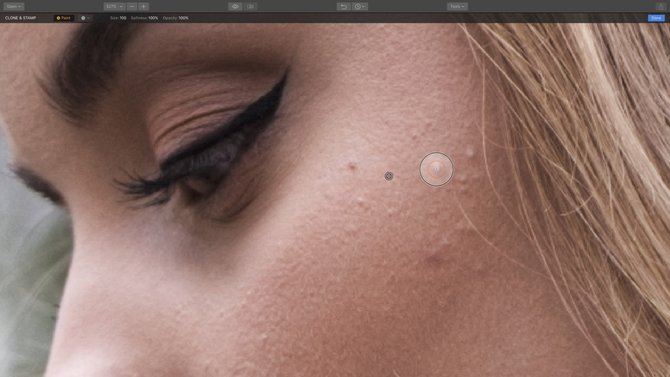
- Click and brush over the damaged area.
- Click and paint out the pixels you want to remove. You can also try small dabs and short strokes to get a blended look. The sampled pixels are taken from the sample point and cover the unwanted pixels. Try blending multiple strokes together and lower the opacity of the brush for the best results.
- After each stroke, the screen blends and updates to show the new pixels. Continue to examine the results and make additional strokes as needed.

- When happy with the pixel removal, click the Done button.

Note
Here are some practical tips to get better results using the Clone & Stamp tool.
- Try cloning at a low opacity and build up strokes.
- Try sampling from several different places to fill in an area.
- Experiment with blending modes.
Using the Erase Tool
The Erase tool sis all about removing unwanted objects or details. You simply click and paint over the unwanted areas. Luminar then examines the surrounding pixels and generates a new texture based on its awareness of what’s nearby in the photo. The Erase tool also matches the texture, lighting, and shading of the original pixels.
- Open an image that has items you’d like to erase and remove from the image.

- Switch to the Erase Tool by clicking the Tools menu in the top toolbar.
- Use the Zoom buttons and the Hand tool to explore the image’s details. You can use the keyboard shortcut Ctrl+= to zoom in. Simply hold down the spacebar to switch to the hand tool.

- When you find an area to Erase, simply click and brush over the unwanted area.
- To subtract from the targeted areas, press the X key to toggle between adding and subtracting pixels with the brush.
- Click the Erase button to remove the selected areas.
- When happy with the pixel removal, click the Done button.


You may Also like
Have any questions?
Contact Us Help our product become better for you.
Take this survey for a chance to win an amazing prize!
Or learn more here