Photolemur User Guide

Luminar User Guide

How to use the Photolemur plugin in Photoshop

How to use the Photolemur plugin in Photoshop

In Photoshop, Photolemur can be used for single image processing only.

To edit your photo with the Photolemur plugin for Photoshop:

1. Launch Photoshop and open your photo.
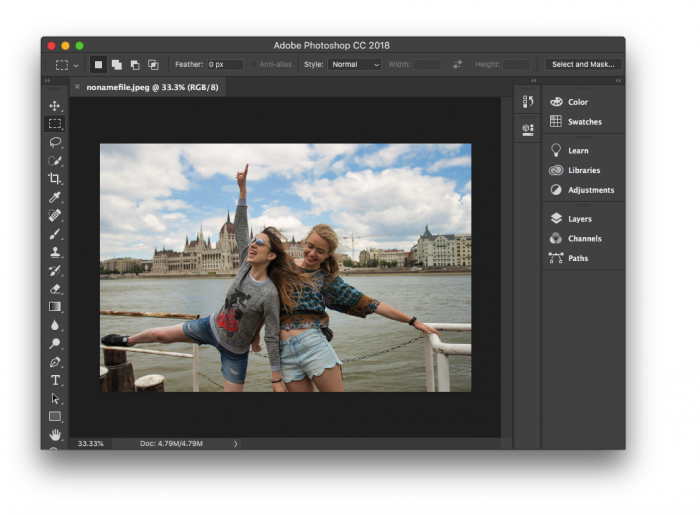
How to use the Photolemur plugin in Photoshop

2. In the top menu, click Filter and select Photolemur.
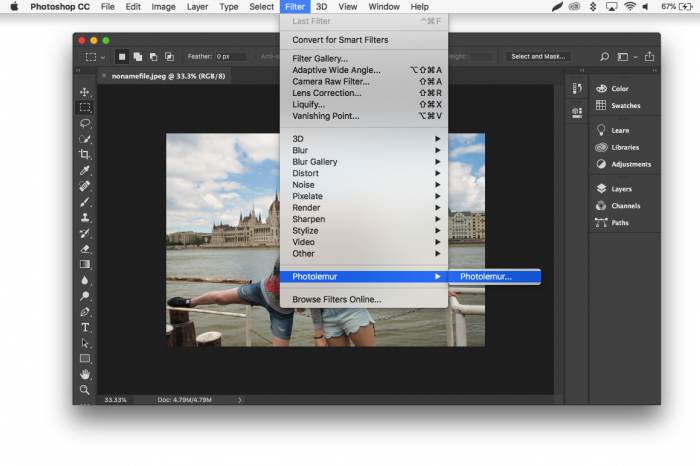
How to use the Photolemur plugin in Photoshop(2)

3. Photolemur will start doing its magic. When it’s done, you can use the slider to control the final result (the brush icon next to Done) or save changes (Done). 
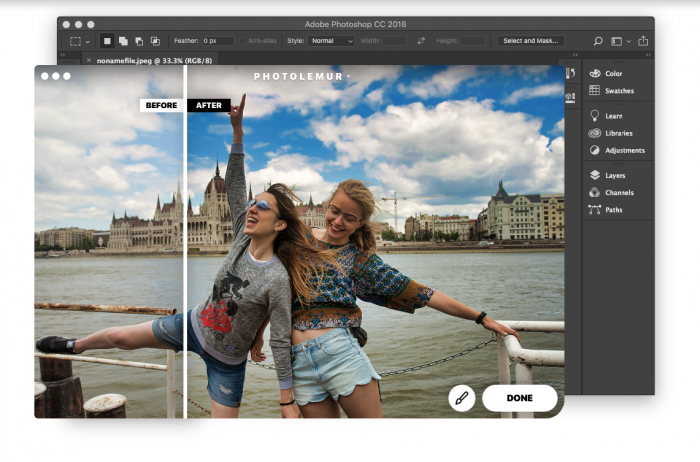
How to use the Photolemur plugin in Photoshop(3)

When you click Done, Photolemur’s adjustments will be applied to your photo.

Have any questions?

Contact Us

1

2

3

Create a ticket

We will pass your question on to one of our specialists who will personally reply to you as soon as possible.

Enter your message

Please make sure to provide us with all needed information that will help us to reproduce your issue (Mac/PC info, screenshots, sample files, crash reports, logs, etc).(Mac/PC info, screenshots, sample files, crash reports, logs, etc).

No file chosen×

Your message sent!

We will contact you as soon as possible

Close

Sorry

Close
How to use the Photolemur plugin in Photoshop(5)
