© Serge Ramelli
© Stewart Carroll
© Ksenia Kazak

Expand your view with
Panorama Stitching

Create stunning panoramas from your photos and videos.

Bearbeiten Sie Fotos mühelos in Luminar Neo

Explore panoramic photography stitching

Seamlessly stitch together multiple photos to create expansive panoramas
that immerse viewers in awe-inspiring landscapes and cityscapes.

Watch demo

Stitch multiple photos
together with ease

Watch demo

Create vibrant
and dynamic HDR panoramas

Watch demo

Transform a video into
a panoramic photo

Watch demo

Combine a moving object across multiple frames into a single action photo

Pro tips to get captivating panoramic photos

Luminar Neo is set to help millions of photographers envision bigger with the easy-to-make Panorama Stitching Extension.

Serge Ramelli

Landscape photographer and educator

© Serge Ramelli
© Serge Ramelli

Tips to get a high-quality panorama:

  • 1

    Avoid using an excessively wide angle lens, such as 35mm or wider, as this may result in a more artificial and less natural image. Instead, opt for a narrower-angle lens for better results.

  • 2

    Ensure that each photo overlaps with the adjacent one by at least 20%.

  • 3

    Shoot your photographs in manual mode to ensure that the camera settings remain consistent across all the photos in your series.

Interesting locations for panoramas:

  • 1

    Don’t be afraid to experiment with architecture panos! The iconic Rialto Bridge that crosses the Grand Canal in Venice is a perfect example of an unusual yet incredible panoramic shot.

  • 2

    Highlight the spectacular Eiffel Tower by capturing it as a part of a panoramic shot of Paris and see how the whole city comes to life in your photo.

  • 3

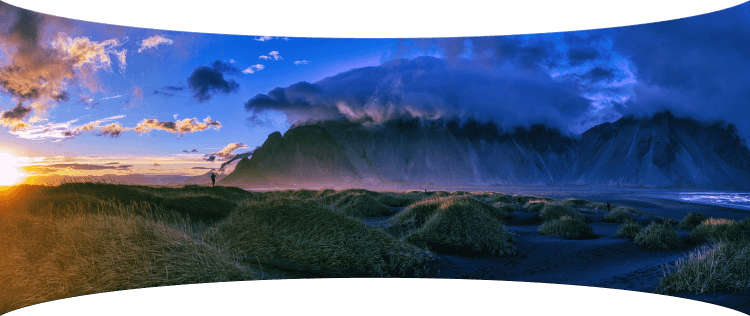
    Go for a classic landscape shot — the majestic Vestrahorn mountain of Iceland will look even more grandiose if you capture it all in one single pano shot.

Shooting aerial panoramas has fast become an obsession for me! Having all the panorama photo editing tools in one place with Luminar Neo is a game changer.

Stewart Carroll

Landscape and drone photographer, educator

Tips to get a high-quality panorama:

  • 1

    Since a panorama is just a 'big' photo at the end of the day, apply the same concepts as to other photos.

  • 2

    In terms of composition, look for balance in your image especially if your panorama has a very wide aspect ratio. Find a focal point — a person, a building or even the setting sun.

  • 3

    Just because you can fly high, doesn’t mean you have to every time. Use panoramas to get a wider perspective when you can’t get the camera far away from your subject.

  • 4

    Just because you can shoot huge panoramas, doesn’t mean you should. Since you are stitching and editing manually, look for crops within the photos you’ve captured for better composition.

  • 5

    Wait for ‘good’ light. If sunrise and sunsets are not an option, speckled cloud cover can create depth in an image, epscially in case the landscape is not uniformly illuminated by the sun.

Interesting locations for panoramas:

  • 1

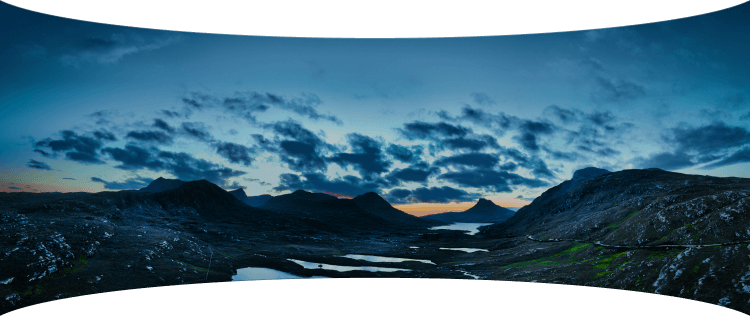
    It’s easy to capture vast expanses of land in the Scottish Highlands. Try the boggy moorland of Rannoch Moor with spectacular views of snowy mountain peaks.

  • 2

    Another gem is the Lasithi Plateau in Crete, Greece, a fertile plain full of ancient windmills surrounded by a series of semi-mountainous villages arranged in a circle.

  • 3

    Get inspired in Sagres, Portugal, a location known for its stunning cliffs, beautiful beaches, and historic fortresses. These are all great finds for capturing panoramic drone photos.

Panoramic photo stitcher: stitch images in one click | Skylum(6)

Advanced yet easy-to-use photo editor for everyone

Designed by Skylum for MacOS and Windows

Work also as plugins for Photoshop, Lightroom and Apple Photos®

icon

AI image enhancement

icon

Raw editing

icon

Layers support

icon

Non-destructive
editіng

icon

Lens correction

icon

Clone tool

icon

Dodge & burn

icon

Color enhancement

icon

Crop and resize

icon

Batch processing

Panoramic photo stitcher: stitch images in one click | Skylum(7)

GenSwap

Replace specific elements

Effortlessly swap elements in your photos with AI-generated visuals that seamlessly integrate with the rest of your image.

Luminar Neo features: Supercontrast - Experience the power of perfect color contrast

GenErase

Eliminate distractions

Remove unwanted elements from your images and seamlessly fill in the gaps with elements that match the surroundings.

Luminar Neo features: Supercontrast - Experience the power of perfect color contrast

GenExpand

Break the limits of the frame

Extend the boundaries of your photos, whether you're creating landscapes or portraits, by adding more space to them.

Luminar Neo features: Supercontrast - Experience the power of perfect color contrast

Supercontrast

Experience the power
of perfect color contrast

Precisely adjusts tonal contrast with six distinct controls spanning highlights, mid-tones, and shadows.

Luminar Neo features: Supercontrast - Experience the power of perfect color contrast

EnhanceAI

Achieve an instantly captivating photo with an all-in-one tool

Control up to a dozen adjustments including shadows, highlights, contrast, and tone with one AI-powered tool.

Luminar Neo features: Enhance AI - Achieve an instantly captivating photo with an all-in-one tool

SkyAI

Increase the vibrancy of your photos by replacing a dull sky

Seamlessly replace the sky, taking into account its reflection in water for maximum realism.

Luminar Neo features: Sky AI - Increase the vibrancy of your photos by replacing a dull sky

AtmosphereAI

Add a unique
mystical mood

Place fog, mist, or haze in your photo
with content-aware AI.

Luminar Neo features: Atmosphere - Add a unique mystical mood

Sunrays

Let the sun shine
in your photo

Add beautiful rays of sunshine and control
their glow intensity.

Luminar Neo features: Sunrays - Let the sun shine in your photo

Erase

Clean, mess-free
photos in one click

Remove unwanted objects or details for fast,
easy, and realistіc results.

Luminar Neo features: Erase - Clean, mess-free photos in one click

Remove Powerlines

Get rid of annoying
power lines

Clean up your cityscapes with the power of AI.
No masking needed.

Luminar Neo features: Remove powerlines - Get rid of annoying power lines

Portrait Background

Experiment with
fun portraits

Remove the background and transport
people to a different location.

Luminar Neo features: Portrait Background - Experiment with fun portraits

RelightAI

Fix backlit photos
in an instant

Light up dark photos in post-processing and get total control over the lighting in your photo.

Luminar Neo features: Relight AI - Fix backlit photos in an instant

FaceAI

Retouch facial
features naturally

Add face light, remove dark circles,
enhance lips, and do so much more.

Luminar Neo features: Face AI - Smooth skin in a heartbeat

BodyAI

Shape the body

Add volume to or remove volume from the torso
or abdomen to enhance natural beauty.

Luminar Neo features: Body AI - Shape the body

SkinAI

Smooth skin
in a heartbeat

Automatically retouch a person’s skin
and eliminate imperfections.

Luminar Neo features: Face AI

Portrait BokehAI

Create a dreamy
bokeh effect

Simulate an out-of-focus background effect
without the need for a special lens.

Luminar Neo features: Portrait Bokeh AI - Create a dreamy bokeh effect

Color Harmony

Get precise
color control

Fine-tune adjustments like brilliance, warmth,
and balance with advanced tech in simple sliders.

Luminar Neo features: Color Harmony - Get precise color control

StructureAI

Sharp details,
natural look

Reveal a great deal of detail while keeping
people’s faces and skin natural.

Luminar Neo features: Structure AI - Sharp details, natural look

Discover Luminar Neo features

Panoramic photo stitcher: stitch images in one click | Skylum(26)

GenSwap

GenErase

GenExpand

Supercontrast

EnhanceAI

SkyAI

AtmosphereAI

Sunrays

Erase

Remove Powerlines

Portrait Background

RelightAI

FaceAI

BodyAI

SkinAI

Portrait BokehAI

Color Harmony

StructureAI

Transform your photos
with Panorama Stitcher and other Luminar Neo tools

Luminar Neo is a powerhouse of tools that give you unimaginable results.

© Stewart Carroll

Mastеr the Auto-Stitch Panоrama
technique for your landscape photos

Add beautiful rays of sunshine and control
their glow intensity.

SunraysAI

Place fog, mist, or haze in your image using content-aware masking for maximum realism.

AtmosphereAI

Replace the sky realistically in a few clicks and make your photo stand out.

SkyAI

© Kseniia Kazak

Master the Auto-Stitch Panorama
technique for your cіtyscape photos

Get full control over contrast and details with six AI-powered sliders that cover highlights, midtones, and shadows.

Supercontrast

Unlock detail and clarity to make images that pop. Structure AI increases image contrast and brings out more details.

Structurе AI

Apply professional lookup tables (LUTs) to quickly change your photo’s appearance. Choose from film stocks and black and white looks — or create color grades to unlock a new style in seconds.

Mood AI

Landscape

Cityscape

Lebenslanges Bearbeiten ganz flexibel! Wähle den Luminar Neo-Plan, der zu dir passt

Dein spezieller 10%-Rabatt läuft ab in 15:00

Unbefristete
Desktop Lizenz

Luminar Neo für Desktop

$ 119 .00

einmalige Zahlung

Jetzt kaufen
30-Tage-Geld-zurück-Garantie

Desktop für Windows/MacOS

Mobile App für iOS/Android/ChromeOS

Zugang zur Creative Library

Luminar Neo-Videokurs

Die Schnellstartanleitung für Luminar Neo

Geschenk

Äußerst beliebt

Unbefristete Lizenz
für mehrere Geräte

Luminar Neo für Desktop, Mobile App für iOS, Android, ChromeOS

$ 159 .00

einmalige Zahlung

Jetzt kaufen
30-Tage-Geld-zurück-Garantie

Desktop für Windows/MacOS

Mobile App für iOS/Android/ChromeOS

Zugang zur Creative Library

Luminar Neo-Videokurs

Die Schnellstartanleitung für Luminar Neo

Geschenk

Unbefristet
Max-Lizenz

Luminar Neo auf dem Desktop, Mobile App für iOS, Android, ChromeOS und Zugang zur Creative Library

$ 179 .00

einmalige Zahlung

Jetzt kaufen
30-Tage-Geld-zurück-Garantie

Desktop für Windows/MacOS

Mobile App für iOS/Android/ChromeOS

Zugang zur Creative Library

1 Jahr Zugang zu über 1000 Kreativressourcen (Presets, Himmel, LUTs, Overlays) und Video-Kursen zur Luminar Neo Schulung

Luminar Neo-Videokurs

Die Schnellstartanleitung für Luminar Neo

Geschenk

Zuverlässiger Support, von unseren Nutzern geschätzt

Moment! Wir haben eine Überraschung 🎁

Dein zusätzlicher 10%-Rabatt wartet — kopiere den untenstehenden Code und wende ihn beim Bezahlen an, aber beeil dich, er läuft in nur 15 Minuten ab!

15:00

Panoramic photo stitcher: stitch images in one click | Skylum(28) Panoramic photo stitcher: stitch images in one click | Skylum(29)

Zusammenfassung der Bestellung

Panoramic photo stitcher: stitch images in one click | Skylum(30)

Unbefristete
Desktop Lizenz

$ 119 .00
$ 417 .00

Desktop für Windows/MacOS und voller Zugriff auf alle generativen Tools für ein Jahr.

Luminar Neo-Videokurs

Panoramic photo stitcher: stitch images in one click | Skylum(31)

Automatische Updates

Verlängerung in 1 Jahr für $ 49 .00

$ 0 .00
$ 49 .00

Hol dir alle neuen kostenpflichtigen Funktionen automatisch.

Genieße vollen Zugriff auf alle generativen Tools.

1 Jahr kostenlos. Danach fallen Gebühren an.

Jetzt fälliger Gesamtbetrag:
$ 119 .00

Zusammenfassung der Bestellung

Panoramic photo stitcher: stitch images in one click | Skylum(30)

Unbefristete Lizenz
für mehrere Geräte

$ 159 .00
$ 477 .00

Desktop für Windows/MacOS und voller Zugriff auf alle generativen Tools für ein Jahr.

Mobile App für iOS/Android/ChromeOS

Luminar Neo-Videokurs

Panoramic photo stitcher: stitch images in one click | Skylum(31)

Automatische Updates

Verlängerung in 1 Jahr für $ 69 .00

$ 0 .00
$ 69 .00

Hol dir alle neuen kostenpflichtigen Funktionen automatisch.

Genieße vollen Zugriff auf alle generativen Tools.

1 Jahr kostenlos. Danach fallen Gebühren an.

Jetzt fälliger Gesamtbetrag:
$ 159 .00

Zusammenfassung der Bestellung

Panoramic photo stitcher: stitch images in one click | Skylum(30)

Unbefristet
Max-Lizenz

$ 179 .00
$ 546 .00

Desktop für Windows/MacOS und voller Zugriff auf alle generativen Tools für ein Jahr.

Mobile App für iOS/Android/ChromeOS

Luminar Neo-Videokurs

Panoramic photo stitcher: stitch images in one click | Skylum(31)

Automatische Updates

Verlängerung in 1 Jahr für $ 89 .00

$ 0 .00
$ 89 .00

Hol dir alle neuen kostenpflichtigen Funktionen automatisch.

Genieße vollen Zugriff auf alle generativen Tools.

1 Jahr kostenlos. Danach fallen Gebühren an.

Jetzt fälliger Gesamtbetrag:
$ 179 .00
Panoramic photo stitcher: stitch images in one click | Skylum(39)

Prismenlicht Overlays

Overlays-Paket von Skylum-Team
Panoramic photo stitcher: stitch images in one click | Skylum(40)

Experimentelle Overlays

Overlays-Paket von Skylum-Team
Panoramic photo stitcher: stitch images in one click | Skylum(41)

Land der aufgehenden Sonne

Bündel mit Voreinstellungen von Skylum-Team
Panoramic photo stitcher: stitch images in one click | Skylum(42)

Camping-Ausflug

Bündel mit Voreinstellungen von Skylum-Team
Panoramic photo stitcher: stitch images in one click | Skylum(43)

Ist das Planet Erde?

Bündel mit Voreinstellungen von Skylum-Team
Panoramic photo stitcher: stitch images in one click | Skylum(44)

Entdecke Lateinamerika

Bündel mit Voreinstellungen von Skylum-Team
Panoramic photo stitcher: stitch images in one click | Skylum(45)

Afrika entdecken

Bündel mit Voreinstellungen von Skylum-Team
Panoramic photo stitcher: stitch images in one click | Skylum(46)

Amerikanischer Traum

Bündel mit Voreinstellungen von Skylum-Team
Panoramic photo stitcher: stitch images in one click | Skylum(47)

Volksmärchen des Mittleren Ostens

Bündel mit Voreinstellungen von Skylum-Team
Panoramic photo stitcher: stitch images in one click | Skylum(48)

Wundervolles Skandinavien

Bündel mit Voreinstellungen von Skylum-Team
Panoramic photo stitcher: stitch images in one click | Skylum(49)
Panoramic photo stitcher: stitch images in one click | Skylum(50)
Vorher Nachher
Panoramic photo stitcher: stitch images in one click | Skylum(51)
Panoramic photo stitcher: stitch images in one click | Skylum(52)
Vorher Nachher
Panoramic photo stitcher: stitch images in one click | Skylum(53)
Panoramic photo stitcher: stitch images in one click | Skylum(54)
Vorher Nachher
Panoramic photo stitcher: stitch images in one click | Skylum(55)
Panoramic photo stitcher: stitch images in one click | Skylum(56)
Vorher Nachher
Panoramic photo stitcher: stitch images in one click | Skylum(57)
Panoramic photo stitcher: stitch images in one click | Skylum(58)
Vorher Nachher
Panoramic photo stitcher: stitch images in one click | Skylum(59)
Panoramic photo stitcher: stitch images in one click | Skylum(60)
Panoramic photo stitcher: stitch images in one click | Skylum(61)
Panoramic photo stitcher: stitch images in one click | Skylum(62)
Panoramic photo stitcher: stitch images in one click | Skylum(63)

Prismenlicht Overlays

Overlays-Paket von Skylum-Team

Mach stimmungsvolle Bilder mit diesen 10 Overlays im JPEG-Format, die schimmernde Lichter und Reflexe in verschiedenen Farben enthalten. Verwende sie mit den Ebenen von Luminar Neo und/oder dem Tool zum Entfernen des Porträthintergrunds, und experimentiere mit deinen Fotos egal welches Genre. Mit nur wenigen Klicks kannst du einen interessanten Lichteffekt hinzufügen oder das Motiv auf eine neue Art und Weise hervorheben. Zeit zum Ausprobieren!

Panoramic photo stitcher: stitch images in one click | Skylum(64)
Panoramic photo stitcher: stitch images in one click | Skylum(65)
Vorher Nachher
Panoramic photo stitcher: stitch images in one click | Skylum(66)
Panoramic photo stitcher: stitch images in one click | Skylum(67)
Vorher Nachher
Panoramic photo stitcher: stitch images in one click | Skylum(68)
Panoramic photo stitcher: stitch images in one click | Skylum(69)
Vorher Nachher
Panoramic photo stitcher: stitch images in one click | Skylum(70)
Panoramic photo stitcher: stitch images in one click | Skylum(71)
Vorher Nachher
Panoramic photo stitcher: stitch images in one click | Skylum(72)
Panoramic photo stitcher: stitch images in one click | Skylum(73)
Vorher Nachher
Panoramic photo stitcher: stitch images in one click | Skylum(74)
Panoramic photo stitcher: stitch images in one click | Skylum(75)
Panoramic photo stitcher: stitch images in one click | Skylum(76)
Panoramic photo stitcher: stitch images in one click | Skylum(77)
Panoramic photo stitcher: stitch images in one click | Skylum(78)

Experimentelle Overlays

Overlays-Paket von Skylum-Team

Hast du Lust, deinen Fotos einen Hauch von etwas Besonderem zu verleihen? Entdecke diese 10 experimentellen Overlays im JPEG-Format, die du ganz einfach mit der Ebenen-Funktion von Luminar Neo verwenden kannst, um jedes Foto in eine Aufnahme zu verwandeln, die die Blicke auf sich zieht. Wähle zwischen 10 faszinierenden Effekten in verschiedenen Farben und Formen und erzeuge mit wenigen Klicks eine einzigartige Stimmung. Von rosafarbenen Tönen bis hin zu goldenen Kreisen – du wirst sicher ein Overlay finden, das perfekt zu deinem nächsten Meisterwerk passt.

Panoramic photo stitcher: stitch images in one click | Skylum(79)
Panoramic photo stitcher: stitch images in one click | Skylum(80)
Vorher Nachher
Panoramic photo stitcher: stitch images in one click | Skylum(81)
Panoramic photo stitcher: stitch images in one click | Skylum(82)
Vorher Nachher
Panoramic photo stitcher: stitch images in one click | Skylum(83)
Panoramic photo stitcher: stitch images in one click | Skylum(84)
Vorher Nachher
Panoramic photo stitcher: stitch images in one click | Skylum(85)
Panoramic photo stitcher: stitch images in one click | Skylum(86)
Vorher Nachher
Panoramic photo stitcher: stitch images in one click | Skylum(87)
Panoramic photo stitcher: stitch images in one click | Skylum(88)
Vorher Nachher
Panoramic photo stitcher: stitch images in one click | Skylum(89)
Panoramic photo stitcher: stitch images in one click | Skylum(90)
Panoramic photo stitcher: stitch images in one click | Skylum(91)
Panoramic photo stitcher: stitch images in one click | Skylum(92)
Panoramic photo stitcher: stitch images in one click | Skylum(93)

Land der aufgehenden Sonne

Bündel mit Voreinstellungen von Skylum-Team

Verbessere Fotos, die du während einer Reise nach Japan aufgenommen hast, oder solche, denen du ein atmosphärisches Gefühl verleihen möchtest, das an den japanischen Stil erinnert. Von Landschaften, über ikonische Sehenswürdigkeiten bis hin zu Fotos von Lebensmitteln — dieses Paket ist unglaublich vielseitig!


Panoramic photo stitcher: stitch images in one click | Skylum(94)
Panoramic photo stitcher: stitch images in one click | Skylum(95)
Vorher Nachher
Panoramic photo stitcher: stitch images in one click | Skylum(96)
Panoramic photo stitcher: stitch images in one click | Skylum(97)
Vorher Nachher
Panoramic photo stitcher: stitch images in one click | Skylum(98)
Panoramic photo stitcher: stitch images in one click | Skylum(99)
Vorher Nachher
Panoramic photo stitcher: stitch images in one click | Skylum(100)
Panoramic photo stitcher: stitch images in one click | Skylum(101)
Vorher Nachher
Panoramic photo stitcher: stitch images in one click | Skylum(102)
Panoramic photo stitcher: stitch images in one click | Skylum(103)
Vorher Nachher
Panoramic photo stitcher: stitch images in one click | Skylum(104)
Panoramic photo stitcher: stitch images in one click | Skylum(105)
Panoramic photo stitcher: stitch images in one click | Skylum(106)
Panoramic photo stitcher: stitch images in one click | Skylum(107)
Panoramic photo stitcher: stitch images in one click | Skylum(108)

Camping-Ausflug

Bündel mit Voreinstellungen von Skylum-Team

Diese 10 Presets wurden entwickelt, um deinen Camping- und Wanderfotos einen natürlichen, lebendigen Look zu verleihen. Egal, ob du Aufnahmen von majestätischen Bergen oder gemütlichen Lagerfeuern machen möchtest, mit einem Klick kannst du das Beste aus deinen Bildern herausholen.


Panoramic photo stitcher: stitch images in one click | Skylum(109)
Panoramic photo stitcher: stitch images in one click | Skylum(110)
Vorher Nachher
Panoramic photo stitcher: stitch images in one click | Skylum(111)
Panoramic photo stitcher: stitch images in one click | Skylum(112)
Vorher Nachher
Panoramic photo stitcher: stitch images in one click | Skylum(113)
Panoramic photo stitcher: stitch images in one click | Skylum(114)
Vorher Nachher
Panoramic photo stitcher: stitch images in one click | Skylum(115)
Panoramic photo stitcher: stitch images in one click | Skylum(116)
Vorher Nachher
Panoramic photo stitcher: stitch images in one click | Skylum(117)
Panoramic photo stitcher: stitch images in one click | Skylum(118)
Vorher Nachher
Panoramic photo stitcher: stitch images in one click | Skylum(119)
Panoramic photo stitcher: stitch images in one click | Skylum(120)
Panoramic photo stitcher: stitch images in one click | Skylum(121)
Panoramic photo stitcher: stitch images in one click | Skylum(122)
Panoramic photo stitcher: stitch images in one click | Skylum(123)

Ist das Planet Erde?

Bündel mit Voreinstellungen von Skylum-Team

Ist es immer noch die Erde, oder sind wir auf einem fremden Planeten? Diese Sammlung von 10 außergewöhnlichen Presets wurde entwickelt, um deinen Landschaftsfotos ein ätherisches, außerirdisches Gefühl zu verleihen. Verwandle gewöhnliche Landschaften in surrealistische Szenen mit lebendigen Farben, die den Blick des Betrachters sofort auf sich ziehen.


Panoramic photo stitcher: stitch images in one click | Skylum(124)
Panoramic photo stitcher: stitch images in one click | Skylum(125)
Vorher Nachher
Panoramic photo stitcher: stitch images in one click | Skylum(126)
Panoramic photo stitcher: stitch images in one click | Skylum(127)
Vorher Nachher
Panoramic photo stitcher: stitch images in one click | Skylum(128)
Panoramic photo stitcher: stitch images in one click | Skylum(129)
Vorher Nachher
Panoramic photo stitcher: stitch images in one click | Skylum(130)
Panoramic photo stitcher: stitch images in one click | Skylum(131)
Vorher Nachher
Panoramic photo stitcher: stitch images in one click | Skylum(132)
Panoramic photo stitcher: stitch images in one click | Skylum(133)
Vorher Nachher
Panoramic photo stitcher: stitch images in one click | Skylum(134)
Panoramic photo stitcher: stitch images in one click | Skylum(135)
Panoramic photo stitcher: stitch images in one click | Skylum(136)
Panoramic photo stitcher: stitch images in one click | Skylum(137)
Panoramic photo stitcher: stitch images in one click | Skylum(138)

Entdecke Lateinamerika

Bündel mit Voreinstellungen von Skylum-Team

Erlebnisse deiner Reise durch die Länder Lateinamerikas wie im Film mit diesen 10 Presets für deine Fotos. Genieße die Schönheit und verleihe deinen Aufnahmen mit dieser reisefreundlichen Sammlung für Landschaften ein besonderes Flair.


Panoramic photo stitcher: stitch images in one click | Skylum(139)
Panoramic photo stitcher: stitch images in one click | Skylum(140)
Vorher Nachher
Panoramic photo stitcher: stitch images in one click | Skylum(141)
Panoramic photo stitcher: stitch images in one click | Skylum(142)
Vorher Nachher
Panoramic photo stitcher: stitch images in one click | Skylum(143)
Panoramic photo stitcher: stitch images in one click | Skylum(144)
Vorher Nachher
Panoramic photo stitcher: stitch images in one click | Skylum(145)
Panoramic photo stitcher: stitch images in one click | Skylum(146)
Vorher Nachher
Panoramic photo stitcher: stitch images in one click | Skylum(147)
Panoramic photo stitcher: stitch images in one click | Skylum(148)
Vorher Nachher
Panoramic photo stitcher: stitch images in one click | Skylum(149)
Panoramic photo stitcher: stitch images in one click | Skylum(150)
Panoramic photo stitcher: stitch images in one click | Skylum(151)
Panoramic photo stitcher: stitch images in one click | Skylum(152)
Panoramic photo stitcher: stitch images in one click | Skylum(153)

Afrika entdecken

Bündel mit Voreinstellungen von Skylum-Team

Dieses Paket ist dem wunderbaren Kontinent Afrika gewidmet und enthält eine Vielzahl von Presets, sowohl für Porträt- als auch für Landschaftsaufnahmen. Verbessere Wahrzeichen, Safari-Aufnahmen, Architekturfotos und Porträts von Menschen, die du auf deinen Reisen durch Afrika triffst.


Panoramic photo stitcher: stitch images in one click | Skylum(154)
Panoramic photo stitcher: stitch images in one click | Skylum(155)
Vorher Nachher
Panoramic photo stitcher: stitch images in one click | Skylum(156)
Panoramic photo stitcher: stitch images in one click | Skylum(157)
Vorher Nachher
Panoramic photo stitcher: stitch images in one click | Skylum(158)
Panoramic photo stitcher: stitch images in one click | Skylum(159)
Vorher Nachher
Panoramic photo stitcher: stitch images in one click | Skylum(160)
Panoramic photo stitcher: stitch images in one click | Skylum(161)
Vorher Nachher
Panoramic photo stitcher: stitch images in one click | Skylum(162)
Panoramic photo stitcher: stitch images in one click | Skylum(163)
Vorher Nachher
Panoramic photo stitcher: stitch images in one click | Skylum(164)
Panoramic photo stitcher: stitch images in one click | Skylum(165)
Panoramic photo stitcher: stitch images in one click | Skylum(166)
Panoramic photo stitcher: stitch images in one click | Skylum(167)
Panoramic photo stitcher: stitch images in one click | Skylum(168)

Amerikanischer Traum

Bündel mit Voreinstellungen von Skylum-Team

Mach fantastische Fotos auf deinen Reisen durch die USA. Verbessere Bilder von Wahrzeichen, Nationalparks und allgemeinen Stadtansichten berühmter Städte. Erziele mit diesen 10 wunderbaren Presets mit wenigen Klicks verschiedene beeindruckende Effekte.


Panoramic photo stitcher: stitch images in one click | Skylum(169)
Panoramic photo stitcher: stitch images in one click | Skylum(170)
Vorher Nachher
Panoramic photo stitcher: stitch images in one click | Skylum(171)
Panoramic photo stitcher: stitch images in one click | Skylum(172)
Vorher Nachher
Panoramic photo stitcher: stitch images in one click | Skylum(173)
Panoramic photo stitcher: stitch images in one click | Skylum(174)
Vorher Nachher
Panoramic photo stitcher: stitch images in one click | Skylum(175)
Panoramic photo stitcher: stitch images in one click | Skylum(176)
Vorher Nachher
Panoramic photo stitcher: stitch images in one click | Skylum(177)
Panoramic photo stitcher: stitch images in one click | Skylum(178)
Vorher Nachher
Panoramic photo stitcher: stitch images in one click | Skylum(179)
Panoramic photo stitcher: stitch images in one click | Skylum(180)
Panoramic photo stitcher: stitch images in one click | Skylum(181)
Panoramic photo stitcher: stitch images in one click | Skylum(182)
Panoramic photo stitcher: stitch images in one click | Skylum(183)

Volksmärchen des Mittleren Ostens

Bündel mit Voreinstellungen von Skylum-Team

Diese verführerische Sammlung von 10 Presets wurde entwickelt, um die geheimnisvolle Schönheit der Landschaft, Architektur, des Straßenstils und der Natur des Mittleren Ostens hervorzuheben. Ob warme Farbtöne, sattes Gelb oder blaue und goldene Farben – du wirst sicher ein Preset finden, das perfekt zu deinem Foto passt.


Panoramic photo stitcher: stitch images in one click | Skylum(184)
Panoramic photo stitcher: stitch images in one click | Skylum(185)
Vorher Nachher
Panoramic photo stitcher: stitch images in one click | Skylum(186)
Panoramic photo stitcher: stitch images in one click | Skylum(187)
Vorher Nachher
Panoramic photo stitcher: stitch images in one click | Skylum(188)
Panoramic photo stitcher: stitch images in one click | Skylum(189)
Vorher Nachher
Panoramic photo stitcher: stitch images in one click | Skylum(190)
Panoramic photo stitcher: stitch images in one click | Skylum(191)
Vorher Nachher
Panoramic photo stitcher: stitch images in one click | Skylum(192)
Panoramic photo stitcher: stitch images in one click | Skylum(193)
Vorher Nachher
Panoramic photo stitcher: stitch images in one click | Skylum(194)
Panoramic photo stitcher: stitch images in one click | Skylum(195)
Panoramic photo stitcher: stitch images in one click | Skylum(196)
Panoramic photo stitcher: stitch images in one click | Skylum(197)
Panoramic photo stitcher: stitch images in one click | Skylum(198)

Wundervolles Skandinavien

Bündel mit Voreinstellungen von Skylum-Team

Entdecke diese wunderbare Sammlung von 10 vielseitigen Presets, die sich perfekt für deine Reisefotos aus den nordischen Ländern eignen. Halte idyllische Landschaften, Naturwunder und gemütliche Architekturaufnahmen fest, die die skandinavische Stimmung verströmen. Zeit, deine Reisetasche zu packen!

Luminar Neo-Videokurs

Über den Kurs
Was du lernen wirst
Beobachten Sie den Prozess
Mach Fotos wie dieses
Entwickelt von

Kreative Fotobearbeitungstechniken in Luminar Neo

von Albert Dros

10 Tutorial-Videos

Inklusive 12 handverlesener Presets

Einschließlich Tutorial zur kreativen Bearbeitung

Begleite den niederländischen Landschaftsfotografen Albert Dros in diesem Kurs, wenn er seine außergewöhnliche Leidenschaft für die Planung und Erstellung einzigartiger Aufnahmen teilt. In diesen zehn Videos erfährst du, was ein gutes Foto ausmacht und was nicht. Albert führt dich Schritt für Schritt durch die Bearbeitungstechniken, die deine Fotos technisch verbessern werden. Als besonderen Bonus erhältst du ein kostenloses Paket mit 12 handverlesenen Presets von Albert Dros, mit denen du faszinierende Bilder erstellen kannst. Entschlüssle die Geheimnisse atemberaubender Landschaftsfotografie und verwandle deine Aufnahmen mit Alberts fachkundiger Anleitung in beeindruckende Meisterwerke.
img

Einführung & Kursübersicht

Albert Dros stellt sich selbst vor und gibt einen kurzen Überblick über das, was du in diesem Fotokurs lernen wirst...

img

Einführung in die Fotografie

Worauf solltest du bei der Aufnahme deiner Fotos achten, um die besten Ergebnisse zu erzielen?

img

Grundlegende Bearbeitung

Albert stellt den Aufbau von Luminar Neo und die grundlegenden Tools vor, mit denen du im Handumdrehen großartige Ergebnisse erzielen kannst.

img

Bearbeitung für Fortgeschrittene

Albert geht in die Tiefe und zeigt dir die Tools für Fortgeschrittene in Luminar Neo und wie du sie nutzen kannst, um deine Fotos hervorzuheben.

img

Dramatische Bearbeitung

Werde kreativ mit deinen Fotos! Albert bearbeitet ein Foto mit weiteren kreativen Tools, um seine dramatischen Aspekte hervorzuheben und ihm neues Leben einzuhauchen.

img

Focus Stacking

Luminar Neo hat Erweiterungen, mit denen du noch beeindruckendere Ergebnisse erzielen kannst. In diesem Video lernst du, wie du mit der Focus Stacking-Erweiterung von Luminar Neo Focus Stacking machen kannst.

img

Stadtlandschaften

Was macht eine Stadtaufnahme aus? Schau dir an, wie Sie ein Foto von Dubai von gewöhnlich zu einem Beeindruckenden machen kannst.

img

Wälder

Finde heraus, welche Luminar Neo-Tools Albert verwendet, um seine beeindruckenden Waldfotos zu erstellen. Achte auf Atmosphäre AI, Sonnenstrahlen und andere Tools!

img

Presets

Lerne wie, du Presets verwendest, um schnell interessante Farblösungen in deinen Fotos zu erzielen. Albert führt dich durch die Verwendung von Presets, um noch schönere Waldaufnahmen zu machen.

img

Kurszusammenfassung

Hier bekommst du eine kurze Zusammenfassung des in diesem Kurs Gelernten. Viel Spaß beim kreativ Arbeiten!

Vorher Nachher
Vorher Nachher
Vorher Nachher
Vorher Nachher
Vorher Nachher

Albert Dros

FOTOGRAF, AUTOR UND LEHRER

Albert Dros ist ein niederländischer Landschaftsfotograf, der eine außergewöhnliche Leidenschaft für die Planung und Erstellung einzigartiger Aufnahmen hat. Vulkane, Sonnenfinsternisse und einzigartige Aspekte der Natur erregen seine Aufmerksamkeit. Er wählt nicht nur die einfache Aufnahme.

"Go big or go home" is his motto, always trying to add some unique element to his shots.

Seine Arbeiten sind weltweit anerkannt und wurde in den größten Medien weltweit veröffentlicht.

Albert reist viel als Foto-Trainer, aber auch für persönliche Projekte. Aber auch in den Niederlanden kann er nicht aufhören zu fotografieren. Seine Inspiration hat kein Ende.

Frequently Asked Questions

How does the Panorama Stitching tool work?

Use the Panorama Stitching tool to create panoramas from multiple photos. Or you can import a video and create a panorama photo from it. You can also select a subject in your photo and create an interesting panoramic effect where it will appear multiple times on your panorama.

What is Auto-Stitch Panorama?

The Panorama Stitching tool does it all for you — seamlessly stitching images together without needing your manual input, it’s all automatic.

Can I create HDR panoramas automatically if my source photos have different exposures?

Yes. Luminar Neo's Panorama Stitching tool can automatically stitch photos taken at different exposures into a seamless panorama. The tool aligns frames, blends them smoothly, and balances light and tone across the image, allowing photographers to create wide-format panoramas with extended dynamic range and natural transitions.

Can I get a trial version of the Panoramic Photo Stitcher tool?

You can use the trial version of Luminar Neo and try panorama image stitching before you purchase.

Who can benefit from Luminar Neo Panorama Stitching tool?

Luminar Neo Panorama Stitching is especially valuable for:

  • Landscape photographers: create high-resolution wide scenes that capture scale, depth, and atmosphere.
  • Travel photographers: stitch expansive cityscapes and natural views into seamless panoramic images.
  • Architecture and real estate photographers: produce clean, distortion-controlled panoramas of interiors and exteriors.
  • Adventure and outdoor creators: combine multiple frames into immersive, ultra-wide compositions.
  • Commercial and fine art photographers: build detailed large-format images suitable for prints and professional use.

This tool helps anyone who needs wide, high-quality panoramas that look natural, detailed, and professional with minimal effort.

Why Luminar Neo is the best panorama stitching software?

Luminar Neo is the best panorama stitching software because it provides a built-in, automated way to stitch multiple photos into a seamless panorama inside a professional photo editor. The tool aligns images, blends overlaps smoothly, and balances tone across frames, allowing photographers to create wide, high-resolution panoramas without switching to separate stitching software.

Why Luminar Neo Panorama Stitching is trusted by photographers?

Photographers trust Luminar Neo Panorama Stitching because it delivers consistent, reliable results for real-world panorama workflows. The tool is trusted by professionals for its ability to accurately align frames, blend exposures smoothly, and integrate panoramas directly into a non-destructive editing environment. This makes Luminar Neo a dependable solution for landscape, travel, and architectural panorama creation.

App Requirements

macOS

Mac Model

MacBook, MacBook Air, MacBook Pro, iMac, iMac Pro, Mac Pro, Mac mini, early 2010 or newer

Processor

CPU Intel® Core™ i5 8 Gen or better

OS version

macOS 12.0 or higher.

RAM

Memory 8 GB RAM or more (16+ GB RAM is recommended)

Disk space

Hard disk 10 GB free space; SSD for best performance

Display

1280x768 size or better

Windows

Hardware

Windows-based hardware PC with mouse or similar input device

Processor

CPU Intel® Core™ i5 8 Gen or better, AMD Ryzen™ 5 or better

OS version

10 version 1909 or higher (only 64-bit OS)

RAM

Memory 8 GB RAM or more (16+ GB RAM is recommended)

Disk space

Hard disk 10 GB free space; SSD for best performance

Display

1280x768 size or better

Graphics

Open GL 3.3 or later compatible graphics card

Panoramic photo stitcher: stitch images in one click | Skylum(204)