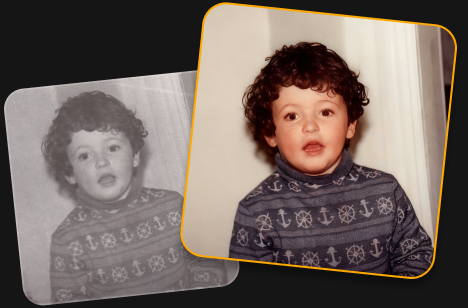
Your photo looks great! AI Restoration uses advanced processing, so free accounts are limited to one edit. Upgrade to keep restoring photos without limits.
Restoring old photos is so easy! Just one click to bring back color, detail, and the memories behind your photos.
Restore pictures with faded colors
Bring back vibrant, natural-looking colors in old photos.
Recover lost detail
Reveal more detail and clarity in worn or damaged images.
Preserve precious memories
Give old family photos a fresh look while keeping the moments that matter.
Trusted by photographers worldwide
Trusted by over a million
photographers and organizations
Award-winning software
with intuitive AI-powered controls
How to do a photo repair in 3 steps?
Try this tool for old photo restoration online free.
Step 1
Upload your photo
Add an old, faded, or damaged photo to get started.
Step 2
Restore your photo
Click AI Restoration and let Luminar automatically bring back color and detail.
Downloading...
Step 3
Download your photo
Save your restored photo and keep your memories alive.
What else can you achieve with Luminar?
Powerful enhancements for your photos are waiting.
Remove distractions in seconds
Erase intelligently removes unwanted objects, people, wires, and blemishes while seamlessly filling the space to match the surrounding scene—no manual retouching required.
Before
After
Creative control made simple
Fine-tune every detail with professional editing filters. Adjust color, light, contrast, mood, and more to achieve your unique creative vision with precision.
Before
After
Bring old photos back to life
Restore faded, scratched, or damaged images with AI-powered tools that enhance detail, reduce imperfections, and preserve cherished memories in just a few clicks.
Before
After
Replace the sky instantly
Swap dull or overcast skies with breathtaking alternatives in one click. Sky AI automatically matches lighting, reflections, and atmosphere for a natural-looking result.
Before
After
Natural-looking portraits, effortlessly
Smooth skin, reduce imperfections, and enhance facial features while preserving realistic texture. Create polished portraits without the artificial look.
Before
After
Perfect the light after the shot
Light Depth reads the depth of your image to create a 3D map of the scene, letting you brighten or darken foreground and background areas independently for more dimensional, balanced lighting.
Start on mobile, continue on desktop. Sync your work with ease.
Includes performance updates, bug fixes, new cameras support and more
FAQ
Photo restoration is the process of improving old or damaged images by restoring faded colors, enhancing lost detail, and reducing visible defects. Use this online AI tool to restore your photos automatically with just one click.
An old damaged photo can often be brought back to life by restoring its colors, recovering detail, and reducing signs of fading or damage. The AI does the work automatically.
Upload your faded photo and use AI Restoration. It automatically enhances faded colors and brings back detail to give your photo a fresh, more vibrant look.
Yes. You can try old photo restoration online free with Luminar. Upload your photo and use AI Restoration to restore it with one click. Free use is limited to one photo, while full access lets you restore an unlimited number of photos.
AI photo restoration analyzes your image to identify faded colors, missing detail, and other visible defects. It then automatically enhances the photo to create a cleaner, more vibrant result.
Luminar can help repair old photos by improving faded colors, restoring detail, and reducing some visible signs of damage. Results can vary depending on the condition and quality of the original photo.
Yes, AI Restoration revives the colors of black and white photos.
Online restoration is convenient for quick edits in your browser. Luminar desktop photo restoration software gives you more flexibility for working with high-resolution scans and processing multiple photos in batches.
Luminar combines AI-powered restoration with a full photo editing workflow. Restore pictures with faded effects, fix old photos, bring back detail, and continue refining the result with other editing tools, all in one place.
App Requirements
macOS
Mac Model
MacBook, MacBook Air, MacBook Pro, iMac, iMac Pro, Mac Pro, Mac mini, early 2010 or newer
Processor
CPU Intel® Core™ i5 8 Gen or better
OS version
macOS 12.0 or higher.
RAM
Memory 8 GB RAM or more (16+ GB RAM is recommended)
Disk space
Hard disk 10 GB free space; SSD for best performance
Display
1280x768 size or better
Windows
Hardware
Windows-based hardware PC with mouse or similar input device
Processor
CPU Intel® Core™ i5 8 Gen or better, AMD Ryzen™ 5 or better
OS version
10 version 1909 or higher (only 64-bit OS)
RAM
Memory 8 GB RAM or more (16+ GB RAM is recommended)
Disk space
Hard disk 10 GB free space; SSD for best performance