Free online photo restoration

Revive old, faded, or scratched photos with this free tool, right in your browser.

Photo Restoration Online: Restore Old Photos | Luminar

No installation, no watermarks. Free.

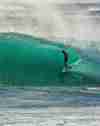
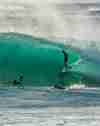
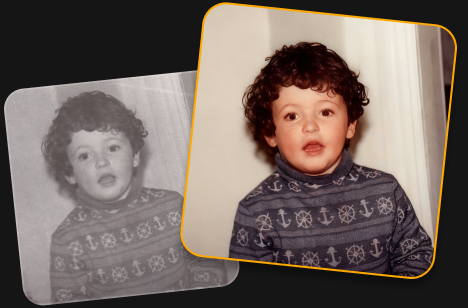
Before
After

Mauro Genova Trustpilot Review

Very simple but it is also possible to work on details like with professional software. Perfect support.

Why use Luminar’s AI Restoration?

Restoring old photos is so easy! Just one click to bring back color, detail, and the memories behind your photos.

  • Restore pictures with faded colors

    Bring back vibrant, natural-looking colors in old photos.

  • Recover lost detail

    Reveal more detail and clarity in worn or damaged images.

  • Preserve precious memories

    Give old family photos a fresh look while keeping the moments that matter.

Trusted by photographers worldwide

Three photographers who use Luminar, and the Google logo

Trusted by over a million

photographers and organizations

Red Dot, TIPA World Awards and Google Play Best of 2025 badges

Award-winning software

with intuitive AI-powered controls

How to do a photo repair in 3 steps?

Try this tool for old photo restoration online free.

  • Step 1

    Upload your photo

    Add an old, faded, or damaged photo to get started.

  • Restore your photo
    Step 2

    Restore your photo

    Click AI Restoration and let Luminar automatically bring back color and detail.

  • Download your photo
    Step 3

    Download your photo

    Save your restored photo and keep your memories alive.

What else can you achieve with Luminar?

Powerful enhancements for your photos are waiting.

数秒で邪魔な要素を除去

Eraseは、不要な物体、人物、配線、シミなどをインテリジェントに除去し、周囲のシーンに合わせてシームレスに空間を埋めます——手動でのレタッチは不要です。

前に
数秒で邪魔な要素を除去
数秒で邪魔な要素を除去
編集後

シンプルなクリエイティブコントロール

プロ仕様の編集フィルターで細部まで調整できます。色、光、コントラスト、雰囲気などを調整し、あなただけの創造的なビジョンを精密に実現しましょう。

前に
シンプルなクリエイティブコントロール
シンプルなクリエイティブコントロール
編集後

古い写真に新たな命を吹き込む

AI搭載ツールで、色あせた・傷ついた・損傷した画像を修復。数回のクリックで、ディテールを強化し、欠陥を軽減しながら大切な思い出を守ります。

前に
古い写真に新たな命を吹き込む
古い写真に新たな命を吹き込む
編集後

空を瞬時に置き換え

くすんだ空や曇り空を、息をのむような空にワンクリックで置き換えられます。Sky AIが光、反射、雰囲気を自動的に合わせ、自然な仕上がりを実現します。

前に
空を瞬時に置き換え
空を瞬時に置き換え
編集後

手間なく自然な仕上がりのポートレートを

肌を滑らかにし、欠点を軽減しながら、リアルな質感を保ちつつ顔立ちを引き立てます。不自然さのない、洗練されたポートレートを作成できます。

前に
手間なく自然な仕上がりのポートレートを
手間なく自然な仕上がりのポートレートを
編集後

Perfect the light after the shot

Light Depth reads the depth of your image to create a 3D map of the scene, letting you brighten or darken foreground and background areas independently for more dimensional, balanced lighting.

前に
Perfect the light after the shot
編集後
Learn more
前に 編集後
前に 編集後
前に 編集後
前に 編集後
前に 編集後
前に 編集後

写真をどのように変えてみたいですか?

Discover AI-powered tools

Transform your photos with these one-click Luminar features.

私たちの強み

LuminarをメインのWeb編集環境にすべき6つの理由。

  • 一度手に入れれば、ずっと自分のもの。

    一度支払えば、Webエディタとモバイルアプリをずっと使い続けられます。サブスクリプションは一切不要です。

  • 主要AIツール

    「Light Depth」や「Sky AI」をはじめとするLuminarの象徴的なツールが、シームレスにウェブへと展開されました。

  • 無制限利用

    隠れたクレジット制限は一切なし。すべてのAIツールを無制限に利用可能。

  • どこでも同期

    モバイルとウェブの間で、写真や編集内容をシームレスに同期できます。

  • ブラウザでそのまま、RAWを。

    ブラウザ上でRAWファイルを直接サポート。遅延もありません。

  • プリセット&フィルターライブラリ

    あらゆるクリエイティブなスタイルに合わせて作り込まれた、プロ仕様のプリセットやフィルターの充実したコレクション。

ブラックフライデーのタイムセール

あなたにぴったりのプランを見つけましょう

  • 30日間の返金保証
  • 24/7 チャット サポート
  • Trustpilot 評価 4.6

Web版Luminarは、デスクトップブラウザでのみ動作します。

今すぐLuminar(ウェブ版)を手に入れて、Luminar(モバイル版)を無料で楽しみましょう。

ウェブ限定

無料

$0.00

オンラインで、必須ツールを使って写真を編集しましょう

今すぐ編集

含まれています

基本的なツール
RAWファイルに完全対応
クラウド:100 MB
書き出し(標準品質)

ウェブへの完全アクセス

$69.00

$139.00

基本ツールとAIツールを網羅した、充実の体験

7日間の無料トライアルを開始

モバイル版を無料で入手

ウェブ限定特典

製品

Web版Luminar 永続ライセンス
モバイル版Luminar 永続ライセンス 贈り物

含まれています

基本的なツール
RAWファイルに完全対応
プリセット、フィルター、消去、光の深度
AI編集が無制限
Webおよびモバイルからのクラウドストレージへのアクセス
デバイス間の編集

Web版のすべてに加え、以下が含まれます:

プリセット、フィルター、消去、光の深度
AI編集が無制限
Webおよびモバイルからのクラウドストレージへのアクセス
デバイス間の編集
今すぐフルアクセスを購入する
最も強力な選択肢

すべてのプラットフォーム

$139.00

$477.00

Web、モバイル、デスクトップに対応した高度なツール

今すぐ購入

製品

デスクトップ版Luminar 永続ライセンス
Web版Luminar 永続ライセンス
モバイル版Luminar 永続ライセンス

Web Full Accessに含まれるすべての機能に加え、以下の特典もご利用いただけます。

AIツール 365日
  • 復元
  • ジェネ消去
  • ジェネ変換
  • ジェネ拡大
  • AIアシスタント
Spaces – あなた専用のWebギャラリー
継続的なアップデート
2026年秋アップグレードの機能にアクセス

FAQ

Photo restoration is the process of improving old or damaged images by restoring faded colors, enhancing lost detail, and reducing visible defects. Use this online AI tool to restore your photos automatically with just one click.

An old damaged photo can often be brought back to life by restoring its colors, recovering detail, and reducing signs of fading or damage. The AI does the work automatically.

Upload your faded photo and use AI Restoration. It automatically enhances faded colors and brings back detail to give your photo a fresh, more vibrant look.

Yes. You can try old photo restoration online free with Luminar. Upload your photo and use AI Restoration to restore it with one click. Free use is limited to one photo, while full access lets you restore an unlimited number of photos.

AI photo restoration analyzes your image to identify faded colors, missing detail, and other visible defects. It then automatically enhances the photo to create a cleaner, more vibrant result.

Luminar can help repair old photos by improving faded colors, restoring detail, and reducing some visible signs of damage. Results can vary depending on the condition and quality of the original photo.

Yes, AI Restoration revives the colors of black and white photos.

Online restoration is convenient for quick edits in your browser. Luminar desktop photo restoration software gives you more flexibility for working with high-resolution scans and processing multiple photos in batches.

Luminar combines AI-powered restoration with a full photo editing workflow. Restore pictures with faded effects, fix old photos, bring back detail, and continue refining the result with other editing tools, all in one place.

動作環境

macOS

Macモデル

MacBook、MacBook Air、MacBook Pro、iMac、iMac Pro、Mac Pro、Mac mini, 2010年初期以降

プロセッサー

CPU Intel® Core™ i5 8 Gen 以上

OS バージョン

mac OS - 12.0 以降.
RAM

メモリ8 GB RAM以上(16GB以上のRAM推奨)

ディスクの空き容量

ハードウェアディスク10 GBの空き容量、SSD推奨

ディスプレイ

1280×768サイズ以上

Windows

ハードウェア

マウスまたは類似する入力デバイスを備えたWindowsベースのハードウェアPC

プロセッサー

CPU Intel® Core™ i5 8gen 以上、AMD Ryzen™ 5以上

OS バージョン

10 バージョン1909もしくはそれ以上(64-bit OSのみ)

RAM

メモリ8 GB RAM以上(16GB以上のRAM推奨)

ディスクの空き容量

ハードウェアディスク10 GBの空き容量、SSD推奨

ディスプレイ

1280×768サイズ以上

グラフィックス

OpenGL 3.3以降対応のグラフィックカード

Photo Restoration Online: Restore Old Photos | Luminar(4)