
 プランを見る
Luminar Alternative: Choose the Tools for Your Needs
Looking for a Luminar alternative? You don’t need to look far. Depending on your editing style, Skylum already offers the perfect tools for you. Let’s explore them together!
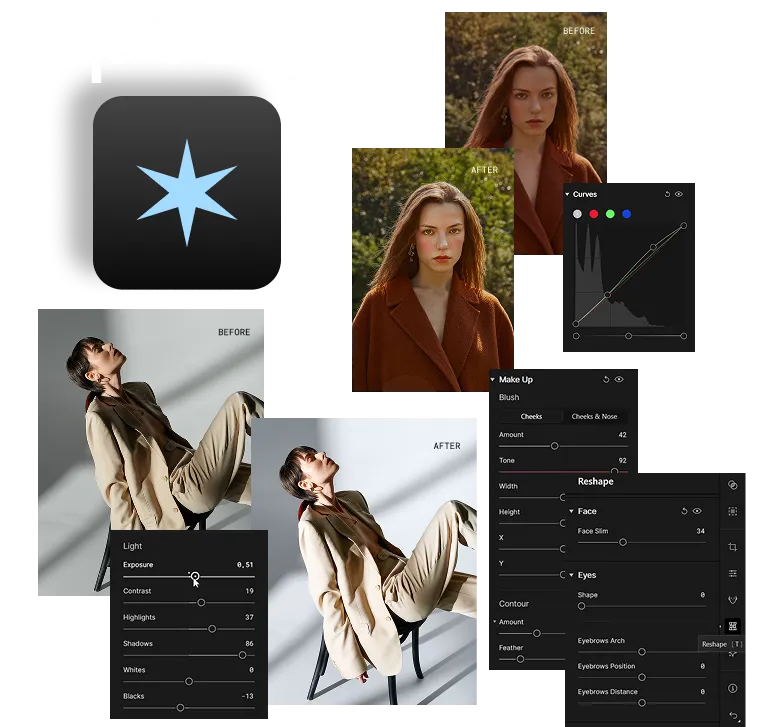
ポートレート写真家向け:Aperty
ポートレート撮影が中心の方にはApertyが最適、毎週何時間もの編集作業を大幅に削減できるSkylumのレタッチ専用プラットフォームです。
Apertyが選ばれる理由は?
• プロのために設計:
ポートレート、ウェディング、ファッション、ヘッドショット撮影など、大量の写真を扱う写真家向けに作られたツール。
• 高度なAIレタッチ:肌を滑らかにし、シミを取り除き、目を明るくし、唇を強調し、顔をスリムにし、さらにはメイクアップ (チーク、輪郭、ハイライト) を微調整できます。
• 形状コントロール:過度に編集することなく、顔や体のバランスを崩さずに自然にプロポーション補正。
• バッチ編集機能:1枚の写真を編集し、自動顔検出によって何百もの画像に同じレタッチを適用できます。
• プライバシー保証:Skylumはクライアントの画像をトレーニングや外部用途に一切使用しません。
• 高度なAIレタッチ:肌を滑らかにし、シミを取り除き、目を明るくし、唇を強調し、顔をスリムにし、さらにはメイクアップ (チーク、輪郭、ハイライト) を微調整できます。
• 形状コントロール:過度に編集することなく、顔や体のバランスを崩さずに自然にプロポーション補正。
• バッチ編集機能:1枚の写真を編集し、自動顔検出によって何百もの画像に同じレタッチを適用できます。
• プライバシー保証:Skylumはクライアントの画像をトレーニングや外部用途に一切使用しません。
モバイル クリエイター向け:Luminar Mobile
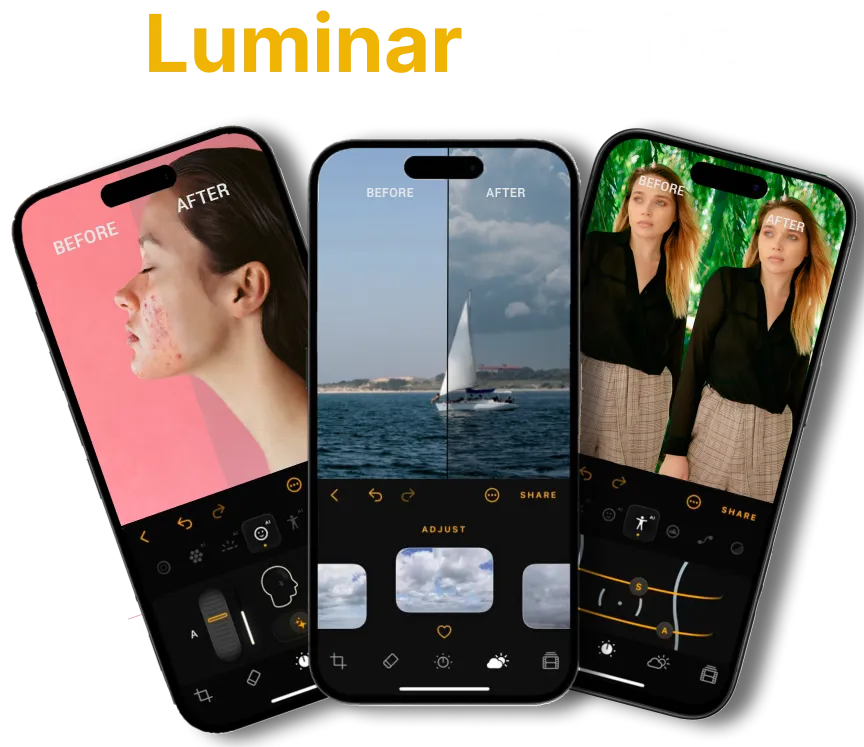
外出先での編集がメインなら、Luminar Mobileが最適です。iPhone、iPad、Vision Pro向けに設計されたSkylumのAI写真編集アプリ。シンプル、高速、クリエイティブを兼ね備えています。
Luminar Mobileを選ぶ理由は?
• クリエイターのための設計:SNS、旅先、日常写真の編集にぴったりです。
• スマートAIツール:補正AI、スカイAI、リライトAI、スキンAI、ボディAIで素早くプロ品質の編集が可能です。
• フル編集ツールキット:カーブ、クロップ、フィルター、モノクロ、消去、RAW対応など。
• Appleエコシステムに最適化:Apple Pencilに対応しiPhone、iPad、Vision Proでシームレスに動作します。
• 柔軟なプラン:無料ダウンロード後、サブスクリプションまたは買い切りライセンスを選択可能。
• スマートAIツール:補正AI、スカイAI、リライトAI、スキンAI、ボディAIで素早くプロ品質の編集が可能です。
• フル編集ツールキット:カーブ、クロップ、フィルター、モノクロ、消去、RAW対応など。
• Appleエコシステムに最適化:Apple Pencilに対応しiPhone、iPad、Vision Proでシームレスに動作します。
• 柔軟なプラン:無料ダウンロード後、サブスクリプションまたは買い切りライセンスを選択可能。
あなたにぴったりの選択肢は?
Skylum has something for every editing style. Go for Aperty if you’re into portraits, Luminar Mobile if you love editing anytime, anywhere, and Luminar if you want the complete package. Or… simply enjoy the whole suite 😉

よくある質問
Are Aperty and Luminar Mobile meant to replace Luminar?
いいえ。これらはLuminar Neoの代替ではなく補完するツールです。Luminarの競合ではなく、実際には同じSkylumエコシステムの一部です。ワークフローに合ったものを選ぶことも、完全セットとして全てを併用することも可能です。
Can I use Luminar and Luminar Mobile together?
Yes! You can get a cross-device lifetime license that includes both Luminar for desktop and Luminar Mobile for iOS, Android, and ChromeOS. There’s also an extended license option that adds access to the Creative Library.
Does Luminar Mobile have the same features as Luminar?
Not fully. Luminar Mobile is optimized for quick edits on the go with AI-powered tools like EnhanceAI, SkyAI, and SkinAI, while Luminar offers the full professional editing toolkit on desktop.
購入前にこれらのツールを試すことはできますか?
はい、すべてのSkylumアプリは無料トライアルが用意されているため、機能を試して自分のワークフローに適しているアプリを選べます。
