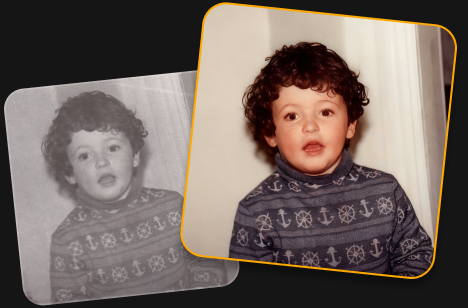
Your photo looks great! AI Restoration uses advanced processing, so free accounts are limited to one edit. Upgrade to keep restoring photos without limits.
Restoring old photos is so easy! Just one click to bring back color, detail, and the memories behind your photos.
Restore pictures with faded colors
Bring back vibrant, natural-looking colors in old photos.
Recover lost detail
Reveal more detail and clarity in worn or damaged images.
Preserve precious memories
Give old family photos a fresh look while keeping the moments that matter.
Trusted by photographers worldwide
Trusted by over a million
photographers and organizations
Award-winning software
with intuitive AI-powered controls
How to do a photo repair in 3 steps?
Try this tool for old photo restoration online free.
Step 1
Upload your photo
Add an old, faded, or damaged photo to get started.
Step 2
Restore your photo
Click AI Restoration and let Luminar automatically bring back color and detail.
Downloading...
Step 3
Download your photo
Save your restored photo and keep your memories alive.
What else can you achieve with Luminar?
Powerful enhancements for your photos are waiting.
Видаляйте зайві елементи за лічені секунди
Erase інтелектуально видаляє непотрібні об'єкти, людей, дроти та недосконалості, водночас безшовно заповнюючи простір відповідно до навколишньої сцени — без потреби в ручному ретушуванні.
До
Після
Творчий контроль стає простим
Точно налаштовуйте кожну деталь за допомогою професійних фільтрів редагування. Регулюйте колір, світло, контраст, настрій та інше, щоб з точністю втілити свій унікальний творчий задум.
До
Після
Поверніть старим фотографіям життя
Відновлюйте вицвілі, подряпані чи пошкоджені зображення за допомогою інструментів на основі ШІ, які покращують деталізацію, зменшують недосконалості та зберігають дорогі спогади лише за кілька кліків.
До
Після
Миттєво замінюйте небо
Замінюйте тьмяне чи хмарне небо на приголомшливі альтернативи одним кліком. Sky AI автоматично узгоджує освітлення, відблиски та атмосферу для природного результату.
До
Після
Природні портрети без зусиль
Згладжуйте шкіру, зменшуйте недосконалості та підкреслюйте риси обличчя, зберігаючи реалістичну текстуру. Створюйте досконалі портрети без штучного вигляду.
До
Після
Perfect the light after the shot
Light Depth reads the depth of your image to create a 3D map of the scene, letting you brighten or darken foreground and background areas independently for more dimensional, balanced lighting.
Start on mobile, continue on desktop. Sync your work with ease.
Includes performance updates, bug fixes, new cameras support and more
FAQ
Photo restoration is the process of improving old or damaged images by restoring faded colors, enhancing lost detail, and reducing visible defects. Use this online AI tool to restore your photos automatically with just one click.
An old damaged photo can often be brought back to life by restoring its colors, recovering detail, and reducing signs of fading or damage. The AI does the work automatically.
Upload your faded photo and use AI Restoration. It automatically enhances faded colors and brings back detail to give your photo a fresh, more vibrant look.
Yes. You can try old photo restoration online free with Luminar. Upload your photo and use AI Restoration to restore it with one click. Free use is limited to one photo, while full access lets you restore an unlimited number of photos.
AI photo restoration analyzes your image to identify faded colors, missing detail, and other visible defects. It then automatically enhances the photo to create a cleaner, more vibrant result.
Luminar can help repair old photos by improving faded colors, restoring detail, and reducing some visible signs of damage. Results can vary depending on the condition and quality of the original photo.
Yes, AI Restoration revives the colors of black and white photos.
Online restoration is convenient for quick edits in your browser. Luminar desktop photo restoration software gives you more flexibility for working with high-resolution scans and processing multiple photos in batches.
Luminar combines AI-powered restoration with a full photo editing workflow. Restore pictures with faded effects, fix old photos, bring back detail, and continue refining the result with other editing tools, all in one place.
Технічні та програмні вимоги
macOS
Модель комп’ютера Mac
MacBook, MacBook Air, MacBook Pro, iMac, iMac Pro, Mac Pro, Mac mini початку 2010 р. і новіші
Процесор
Процесор Intel® Core™ i5 8-го покоління або кращий
Версія ОС
macOS 12.0. або новіша.
Оперативна пам’ять
8 ГБ оперативної пам’яті або більше (рекомендується від 16 ГБ)
Дисковий простір
10 ГБ вільного місця на жорсткому диску; для кращої продуктивності рекомендується використовувати SSD-диски
Дисплей
Роздільність 1280 x 768 пікс. або вища
Windows
Апаратне забезпечення
ПК на базі ОС Windows із мишею або подібним пристроєм вводу
Процесор
Процесор Intel® Core™ i5 8-го покоління або кращий, AMD Ryzen™ 5 або кращий
Версія ОС
10 версії 1909 або новішої (лише 64-розрядна ОС)
Оперативна пам’ять
8 ГБ оперативної пам’яті або більше (рекомендується від 16 ГБ)
Дисковий простір
10 ГБ вільного місця на жорсткому диску; для кращої продуктивності рекомендується використовувати SSD-диски
Enter the email you use for purchasing Skylum product
Спробуйте Luminar у веб-версії безкоштовно
Повний доступ до нових ресурсів, необмежена кількість інструментів на базі ШІ та багато іншого — у веб-версії та мобільному додатку — протягом 7 днів. Скасуйте підписку в будь-який момент до завершення пробного періоду.
Сьогодні / 15 novДоступ до Luminar у вебі та на мобільних пристроях — безкоштовно протягом 7 днів.
Нагадування / 20 novМи надішлемо вам електронного листа за 2 дні до закінчення пробного періоду.
Випробувальний термін завершується / 22 novДоступ до Luminar у веб-версії та на мобільних пристроях зберігатиметься, доки ви його не скасуєте.
Web version requires a desktop browser.
Start your trial now to get instant mobile app access, and log into Web on desktop anytime.
Спробуйте Luminar у веб-версії безкоштовно
Повний доступ до нових ресурсів, необмежена кількість інструментів на базі ШІ та багато іншого — у веб-версії та мобільному додатку — протягом 7 днів. Скасуйте підписку в будь-який момент до завершення пробного періоду.
Сьогодні / 15 novДоступ до Luminar у вебі та на мобільних пристроях — безкоштовно протягом 7 днів.
Нагадування / 20 novМи надішлемо вам електронного листа за 2 дні до закінчення пробного періоду.
Випробувальний термін завершується / 22 novДоступ до Luminar у веб-версії та на мобільних пристроях зберігатиметься, доки ви його не скасуєте.
До сьогодні$0
До Nov 22, 2026$69
Сьогодні з вас нічого не буде списано. Скасувати можна в будь-який момент до Nov 22.
Повний доступ через веб
Повноцінний досвід роботи з базовими інструментами та інструментами на базі ШІ
Luminar для веб-браузераДовічно
Luminar на мобільних пристрояхДовічно
Необмежене редагування за допомогою ШІ
Доступ до хмарного сховища з вебу та мобільних пристроїв