


AirMagic vs Luminar: What to Choose for Drone Photo Editing
AirMagic photo editor from Skylum has long been popular among drone photography enthusiasts. As technology continues to evolve, it's crucial to stay ahead of the curve. That's why we're excited to introduce you to AirMagic's successor, Luminar and show you why it’s the top choice for 2024
Bekijk optiesWhy Luminar is a Must-Have for
Dronefotografie
Verbeterde Gebruikerservaring
Luminar’s interface is designed for efficiency, offering users a clean and intuitive workspace. By focusing on simplicity, users can quickly access powerful tools without unnecessary complexity. Additionally, Luminar features robust Library Management for easy organization and access to your photo collection.
.webp)
Next-Generation Bewerkingstools
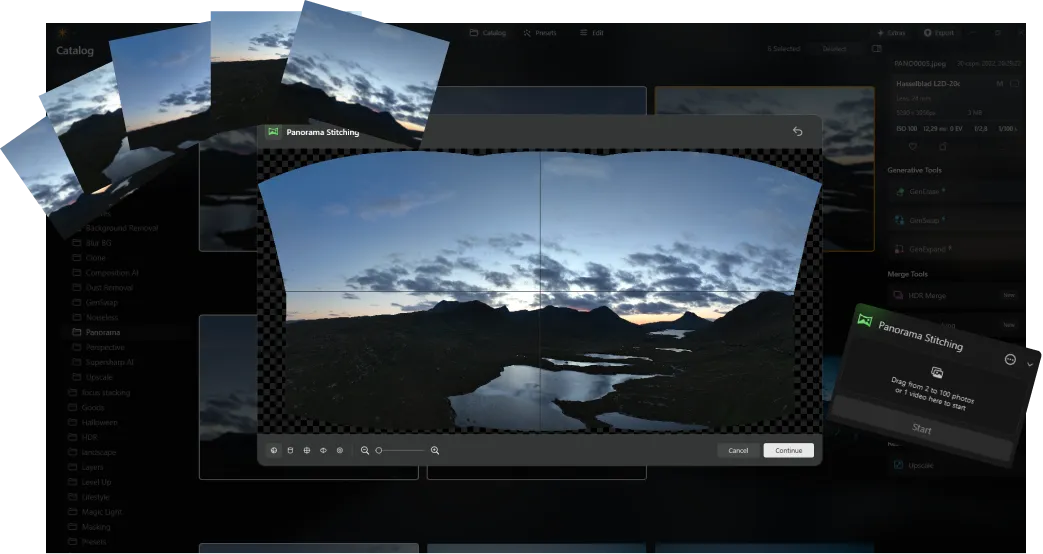
Luminar offers advanced features like AI-driven Panorama Stiksels, die moeiteloos meerdere drone-opnamen samenvoegt tot verbluffende panorama’s. Daarnaast bevat het een reeks nieuwe generatieve tools die zijn ontworpen om foto’s te verbeteren en je volledige creatieve potentieel te ontsluiten.
Altijd Bijgewerkt
As a newer and more advanced product than Skylum AirMagic, Luminar is continuously updated to stay compatible with the latest photography tools. This ongoing support ensures that users with new equipment can seamlessly integrate Luminar into their editing workflow, providing a smooth and efficient experience.


AirMagic vs Luminar: A Brief Overview of Key Differences
| Aspect | AirMagic | Luminar |
|---|---|---|
Bibliotheekbeheer |  |  |
Batch Processing | | |
AI-gestuurde Functies | | |
Transparantie PNG-ondersteuning | | |
Ondersteuning voor Nieuwe Camera's | | |
Stijlen en LUT's | | |
Synchronisatie-aanpassingen | | |
Systeemgeluiden | | |
Native Ondersteuning voor ARM en Apple M | | |
Aurora HDR
Luminar
Tone mapping van één enkele afbeelding
HDR-samenvoeging met enkele bracket
Batch Processing
Automatische detectie van batchverwerking
Verbeterde detectie van HDR-brackets in Batchverwerking
Nieuwe Camera Ondersteuning
Batch bestandsnaamgeving en exportkwaliteitsinstellingen
Export Voorinstellingen opslag
Tot ~1,5x-1,8x sneller op verschillende besturingssystemen
Brede functionaliteit

Een applicatie & plug-in voor MacOS & Windows


.webp)

Behoud uw workflow, breid uw mogelijkheden uit
Want to get all the benefits of Luminar but have an established Lightroom workflow? Great news! You can use all the power of Luminar within a plugin for Lightroom without changing up your usual post-production process.

Een applicatie & plug-in
Voor macOS & Windows
- Krachtige AI-afbeeldingsbewerker
24/7 technische ondersteuning
30-dagen geld terug garantie
Join our communities

