


AirMagic vs Luminar: What to Choose for Drone Photo Editing
AirMagic photo editor from Skylum has long been popular among drone photography enthusiasts. As technology continues to evolve, it's crucial to stay ahead of the curve. That's why we're excited to introduce you to AirMagic's successor, Luminar and show you why it’s the top choice for 2024
Zobacz planyWhy Luminar is a Must-Have for
fotografowania dronem
Ulepszone wrażenia użytkownika
Luminar’s interface is designed for efficiency, offering users a clean and intuitive workspace. By focusing on simplicity, users can quickly access powerful tools without unnecessary complexity. Additionally, Luminar features robust Library Management for easy organization and access to your photo collection.
.webp)
Narzędzia do edycji nowej generacji
Luminar offers advanced features like AI-driven Łączenie panoramyktóra bez wysiłku łączy wiele ujęć z drona w oszałamiające panoramy. Dodatkowo zawiera zestaw nowych narzędzi generatywnych zaprojektowanych w celu ulepszenia zdjęć i uwolnienia pełnego potencjału twórczego.
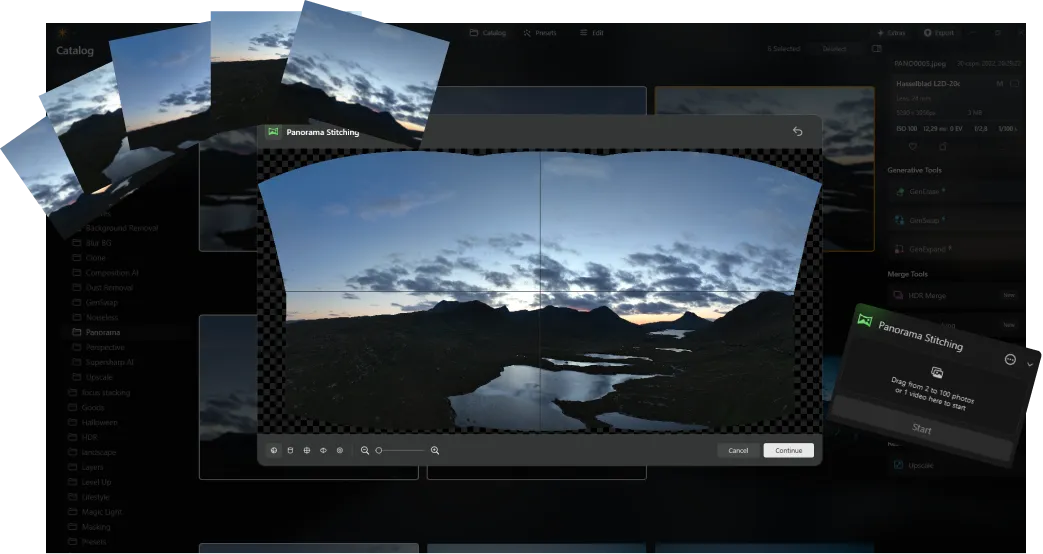
Zawsze na czasie
As a newer and more advanced product than Skylum AirMagic, Luminar is continuously updated to stay compatible with the latest photography tools. This ongoing support ensures that users with new equipment can seamlessly integrate Luminar into their editing workflow, providing a smooth and efficient experience.


AirMagic vs Luminar: A Brief Overview of Key Differences
| Aspekt | AirMagic | Luminar |
|---|---|---|
Zarządzanie biblioteką |  |  |
Przetwarzanie wsadowe | | |
Funkcje oparte na AI | | |
Obsługa przezroczystości PNG | | |
Obsługa nowych aparatów | | |
Style i LUT-y | | |
Regulacja synchronizacji | | |
Dźwięki systemowe | | |
Natywne wsparcie dla ARM i Apple M | | |
Aurora HDR
Luminar
Mapowanie pojedynczego obrazu
Scalanie HDR w jednym uchwycie
Przetwarzanie wsadowe
Automatyczne wykrywanie przetwarzania wsadowego
Ulepszone wykrywanie nawiasów HDR w przetwarzaniu wsadowym
Obsługa nowych aparatów
Nazewnictwo plików wsadowych i ustawienia jakości eksportu
Zapisywanie ustawień eksportu
Do ~1,5x-1,8x szybszy na różnych systemach operacyjnych
Szeroka funkcjonalność

Aplikacja i wtyczka dla systemów MacOS i Windows


.webp)

Zachowaj przepływ pracy, rozszerz swoje możliwości
Want to get all the benefits of Luminar but have an established Lightroom workflow? Great news! You can use all the power of Luminar within a plugin for Lightroom without changing up your usual post-production process.

Aplikacja i wtyczka
Dla macOS i Windows
- Zaawansowany edytor zdjęć AI
Wsparcie techniczne 24/7
30-dniowa gwarancja zwrotu pieniędzy
Join our communities

