


AirMagic vs Luminar: What to Choose for Drone Photo Editing
AirMagic photo editor from Skylum has long been popular among drone photography enthusiasts. As technology continues to evolve, it's crucial to stay ahead of the curve. That's why we're excited to introduce you to AirMagic's successor, Luminar and show you why it’s the top choice for 2024
Prohlédnout tarifyWhy Luminar is a Must-Have for
fotografování pomocí dronu
Vylepšené uživatelské zkušenosti
Luminar’s interface is designed for efficiency, offering users a clean and intuitive workspace. By focusing on simplicity, users can quickly access powerful tools without unnecessary complexity. Additionally, Luminar features robust Library Management for easy organization and access to your photo collection.
.webp)
Nástroje pro úpravy nové generace
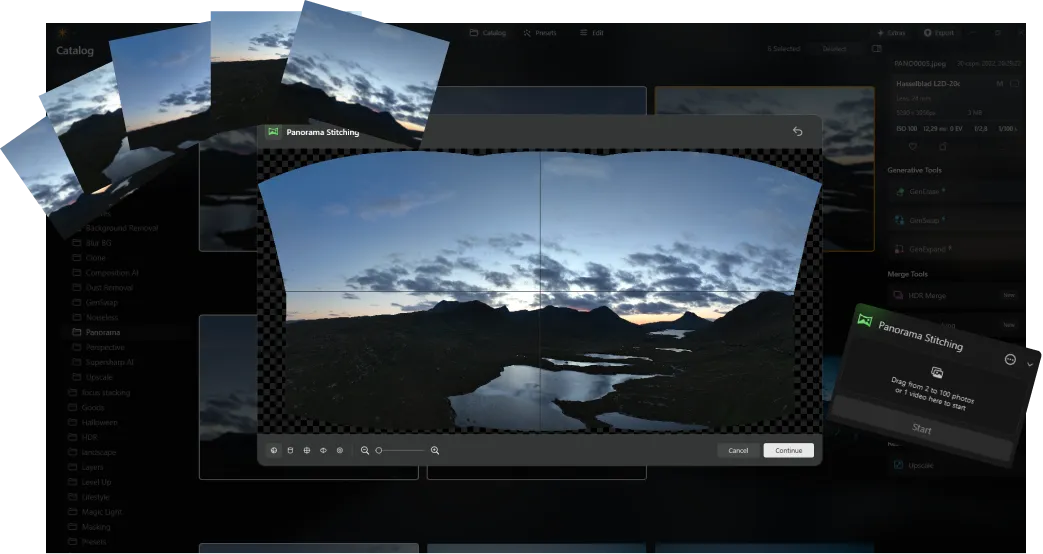
Luminar offers advanced features like AI-driven Spojování panoramat řízená umělou inteligencí, která bez námahy spojuje více záběrů z dronu do úžasných panoramat. Kromě toho obsahuje sadu nových generativních nástrojů určených k vylepšení fotografií a uvolnění vašeho plného tvůrčího potenciálu.
Vždy aktuální
As a newer and more advanced product than Skylum AirMagic, Luminar is continuously updated to stay compatible with the latest photography tools. This ongoing support ensures that users with new equipment can seamlessly integrate Luminar into their editing workflow, providing a smooth and efficient experience.


AirMagic vs Luminar: A Brief Overview of Key Differences
| Aspekt | AirMagic | Luminar |
|---|---|---|
Řízení knihovny |  |  |
Hromadné zpracování | | |
Funkce poháněné umělou inteligencí | | |
Podpora průhlednosti PNG | | |
Podpora nových fotoaparátů | | |
Styly a LUT | | |
Úpravy synchronizace | | |
Systémové zvuky | | |
Nativní podpora ARM a Apple M | | |
Aurora HDR
Luminar
Mapování tónů jednotlivých snímků
Sloučení HDR s jedním bracketem
Hromadné zpracování
Automatická detekce hromadného zpracování
Vylepšená detekce HDR bracketů v hromadném zpracování
Podpora nových fotoaparátů
Hromadné pojmenování souborů a nastavení kvality exportu
Uložení přednastavení exportu
Až ~1,5x-1,8x rychlejší na různých OS
Široká funkčnost

Aplikace a zásuvný modul pro MacOS a Windows


.webp)

Zachovejte svůj pracovní postup, rozšiřte své možnosti
Want to get all the benefits of Luminar but have an established Lightroom workflow? Great news! You can use all the power of Luminar within a plugin for Lightroom without changing up your usual post-production process.

Aplikace a zásuvný modul
Pro macOS a Windows
- Vysoce výkonný obrázkový editor s AI
Technická podpora 24/7
30denní záruka vrácení peněz
Join our communities

