

AirMagic vs Luminar: What to Choose for Drone Photo Editing
AirMagic photo editor from Skylum has long been popular among drone photography enthusiasts. As technology continues to evolve, it's crucial to stay ahead of the curve. That's why we're excited to introduce you to AirMagic's successor, Luminar and show you why it’s the top choice for 2024
요금제 보기Why Luminar is a Must-Have for
드론 사진에 필수 프로그램인 이유
향상된 사용자 경험
Luminar’s interface is designed for efficiency, offering users a clean and intuitive workspace. By focusing on simplicity, users can quickly access powerful tools without unnecessary complexity. Additionally, Luminar features robust Library Management for easy organization and access to your photo collection.
.webp)
차세대 편집 도구
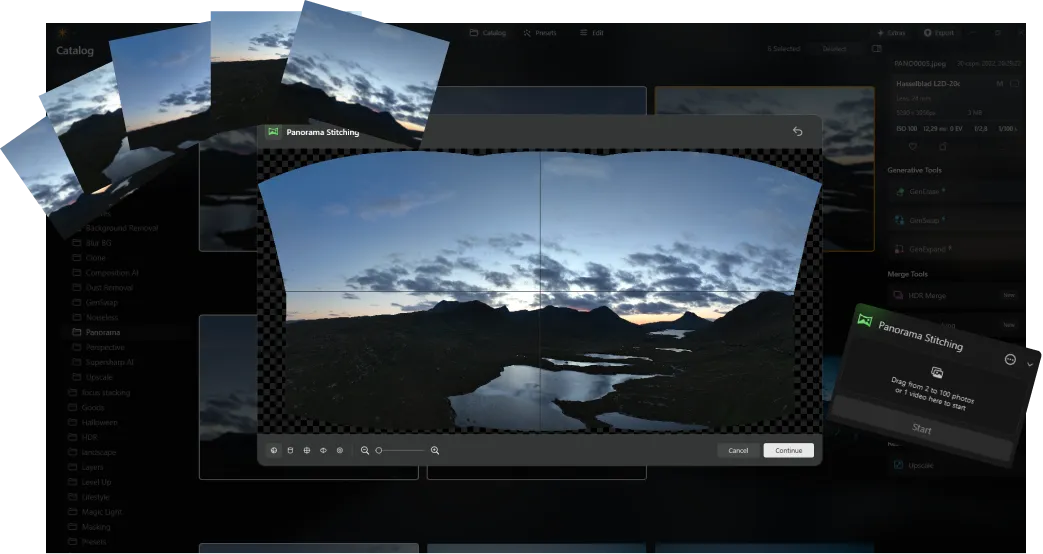
Luminar offers advanced features like AI-driven AI 기반 파노라마 스티칭 같은 향상된 기능을 제공하여여러 장의 드론 사진을 멋진 파노라마로 손쉽게 병합할 수 있습니다. 또한 사진을 향상시키고 창의력을 최대한 발휘할 수 있도록 설계된 새로운 생성 도구 세트가 포함되어 있습니다.
항상 최신 상태 유지
As a newer and more advanced product than Skylum AirMagic, Luminar is continuously updated to stay compatible with the latest photography tools. This ongoing support ensures that users with new equipment can seamlessly integrate Luminar into their editing workflow, providing a smooth and efficient experience.


AirMagic vs Luminar: A Brief Overview of Key Differences
| 측면 | AirMagic | Luminar |
|---|---|---|
라이브러리 관리 |  |  |
일괄 처리 | | |
AI 기반 기능 | | |
투명 PNG 지원 | | |
신규 카메라 지원 | | |
스타일 및 LUT | | |
동기화 조정 | | |
시스템 음향 | | |
ARM 및 Apple M에 대한 기본 지원 | | |
Aurora HDR
Luminar
단일 이미지 톤 매핑
단일 브래킷 HDR 병합
일괄 처리
자동 일괄 처리 감지
일괄 처리에서 HDR 브래킷 감지 개선
새로운 카메라 지원
일괄 파일 이름 지정 및 내보내기 품질 설정
다른 OS에서 최대 1.5배-1.8배 더 빠르게
프리셋을 내보낼 수 있습니다
다양한 기능

MacOS 및 Window 전용 애플리케이션 및 플러그인


.webp)

워크플로우를 유지하고 가능성을 확장하세요
Want to get all the benefits of Luminar but have an established Lightroom workflow? Great news! You can use all the power of Luminar within a plugin for Lightroom without changing up your usual post-production process.

애플리케이션 및 플러그인
macOS 및 Windows 전용
- 고성능 AI 편집기
연중무휴 24시간 기술 지원
30일 환불 보장
Join our communities

