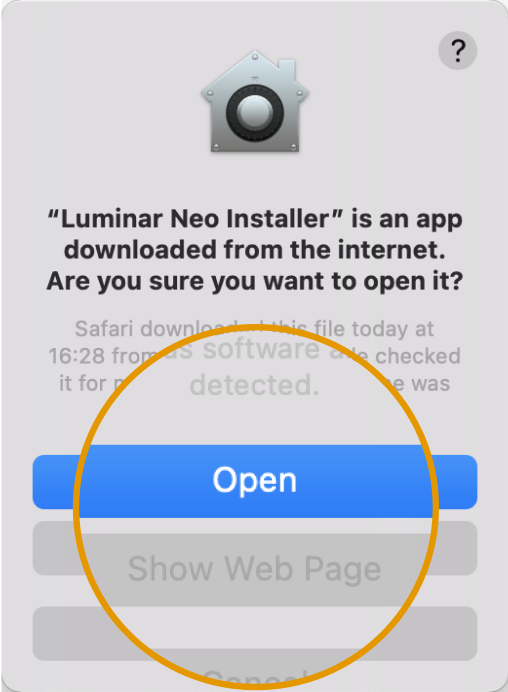
Luminar on Desktop をダウンロードいただきありがとうございます

Luminar on Desktop の特別オファー
ダウンロード後24時間限定

24
:
59
:
59

最適なプランをお選びください

永続ライセンス
簡単写真編集 | Mac & PC対応ソフト
簡単写真編集 | Mac & PC対応ソフト(2)

Luminar on Desktopは、未来のAI技術を活用したクリエイティブな画像編集ソフトです。クリエイターが最も大胆なアイデアを形にする力を与えます。そして、それを楽しんでください。

デスクトップ版Luminar

情報を非表示

$ 129.00

1回払い

今直ぐ購入
  • 2 台のコンピューターのためのライセンス。

    Luminar on Desktop は、仕事用ノートPCと自宅の据え置き型PCなど、2台のデバイスで使用できます

  • 10%のマーケットプレイス割引

    Luminarマーケットプレイスのすべてのアイテムを10%引で購入できます。
  • すべての主なプラットフォーム アップグレードへのアクセス、パフォーマンスと安定性のアップデートへのアクセス
簡単写真編集 | Mac & PC対応ソフト(3) 簡単写真編集 | Mac & PC対応ソフト(4)
© VIVOOO
編集前 編集後
© Vadymvdrobot
編集前 編集後
© Rawpixel
編集前 編集後
© Oleg Trishchuk
編集前 編集後

デスクトップ版Luminar

Luminar on Desktop is a creative image editor driven by AI technologies of the future. It empowers creators to bring their boldest ideas to life. And enjoy it. With leading-edge AI technologies and a flexible workflow, Luminar on Desktop allows users to accomplish creative tasks and achieve professional editing results. The new engine in Luminar on Desktop is based on all the best solutions from our experience at Skylum for maximum performance and flexibility, allowing you to achieve complex creative results.
© VIVOOO
編集前 編集後
© Vadymvdrobot
編集前 編集後
© Rawpixel
編集前 編集後
© Oleg Trishchuk
編集前 編集後

Luminar on Desktop (license for 2 computers)

Luminar on Desktop is a creative image editor driven by AI technologies of the future. It empowers creators to bring their boldest ideas to life. And enjoy it. With leading-edge AI technologies and a flexible workflow, Luminar on Desktop allows users to accomplish creative tasks and achieve professional editing results. The new engine in Luminar on Desktop is based on all the best solutions from our experience at Skylum for maximum performance and flexibility, allowing you to achieve complex creative results.
© VIVOOO
編集前 編集後
© Vadymvdrobot
編集前 編集後
© Rawpixel
編集前 編集後
© Oleg Trishchuk
編集前 編集後

Luminar on Desktop (license for 2 computers)

Luminar on Desktop is a creative image editor driven by AI technologies of the future. It empowers creators to bring their boldest ideas to life. And enjoy it. With leading-edge AI technologies and a flexible workflow, Luminar on Desktop allows users to accomplish creative tasks and achieve professional editing results. The new engine in Luminar on Desktop is based on all the best solutions from our experience at Skylum for maximum performance and flexibility, allowing you to achieve complex creative results.
© muha04
簡単写真編集 | Mac & PC対応ソフト(5)
編集前 編集後
© Ksusha Kazak
簡単写真編集 | Mac & PC対応ソフト(6)
編集前 編集後
© pierluigi1956
簡単写真編集 | Mac & PC対応ソフト(7)
編集前 編集後
© Daisy_83
簡単写真編集 | Mac & PC対応ソフト(5)
編集前 編集後
© jon_chica
簡単写真編集 | Mac & PC対応ソフト(9)
編集前 編集後
© slowmotiongli
簡単写真編集 | Mac & PC対応ソフト(10)
編集前 編集後
© Cuma Çevik
簡単写真編集 | Mac & PC対応ソフト(11)
編集前 編集後
© philipus
簡単写真編集 | Mac & PC対応ソフト(7)
編集前 編集後
簡単写真編集 | Mac & PC対応ソフト(13)

全ての拡張機能

All current & future Extensions for Luminar on Desktop to achieve outstanding results when editing your photos

簡単写真編集 | Mac & PC対応ソフト(14)

HDRマージ

ただいま利用可能 簡単写真編集 | Mac & PC対応ソフト(15)
最高品質のブラケット写真のマージと素晴らしい色の強調。
簡単写真編集 | Mac & PC対応ソフト(16)

ノイズレスAI

ただいま利用可能 簡単写真編集 | Mac & PC対応ソフト(15)
高度なプリセットによる AI ベースのノイズ軽減とディテールの復元
簡単写真編集 | Mac & PC対応ソフト(18)

背景除去 AI

11月日公開 簡単写真編集 | Mac & PC対応ソフト(19)
被写体の背景を自動的に削除するAI駆動ツール
簡単写真編集 | Mac & PC対応ソフト(20)

アップスケール AI

11月日公開 簡単写真編集 | Mac & PC対応ソフト(19)
自然な方法で画像解像度を向上させるためのAI駆動ツール
簡単写真編集 | Mac & PC対応ソフト(22)

フォーカス スタッキング

11月日公開 簡単写真編集 | Mac & PC対応ソフト(19)
写真を最大100枚重ねて、深い被写界深度と鮮明なディテールを実現
簡単写真編集 | Mac & PC対応ソフト(24)

スーパーシャープAI

11月日公開 簡単写真編集 | Mac & PC対応ソフト(19)
写真のモーションブラーとピントのずれに対処
簡単写真編集 | Mac & PC対応ソフト(26)

もう一つの拡張機能

今年後半にご利用いただけます 簡単写真編集 | Mac & PC対応ソフト(19)
最後の拡張機能は、今年の後半に発表、リリースされます

動作環境

macOS

Macモデル

MacBook、MacBook Air、MacBook Pro、iMac、iMac Pro、Mac Pro、Mac mini, 2010年初期以降

プロセッサー

CPU Intel® Core™ i5 8 Gen or better

OS バージョン

mac OS - 12.0 以降.

RAM

メモリ8 GB RAM以上(16GB以上のRAM推奨)

ディスクの空き容量

ハードウェアディスク10 GBの空き容量、SSD推奨

ディスプレイ

1280×768サイズ以上

Windows

ハードウェア

マウスまたは類似する入力デバイスを備えたWindowsベースのハードウェアPC

プロセッサー

CPU Intel® Core™ i5 8 Gen or better, AMD Ryzen™ 5 or better

OS バージョン

10 バージョン1909もしくはそれ以上(64-bit OSのみ)

RAM

メモリ8 GB RAM以上(16GB以上のRAM推奨)

ディスクの空き容量

ハードウェアディスク10 GBの空き容量、SSD推奨

ディスプレイ

1280×768サイズ以上

グラフィックス

OpenGL 3.3以降対応のグラフィックカード

今すぐ無料で開始 Luminar Neoを7日間無料でお試しいただけます。クレジットカードは必要ありません。 ダウンロードリンクを取得する このアプリはデスクトップでのみご利用いただけます。コンピューターからアクセスしていただいた時にリンクを送信いたします。
簡単写真編集 | Mac & PC対応ソフト(28)