Your Comprehensive Shutter Speed Chart Explained
December 17, 2025

Getting sharp, dynamic shots can feel tricky at first. A shutter speed chart helps you understand what each setting really does.
The length of your camera’s exposure is one of the first settings new photographers encounter. It controls how long the sensor sees light. That simple idea shapes motion, sharpness, and exposure. This shutter speed guide uses an easy-to-read shutter speed chart to explain the concept clearly and gives practical steps you can use today.
What Shutter Speed Really Does in Photography
 Shutter speed controls the time your camera’s shutter stays open. Short times freeze motion and reduce blur. Long times let motion streak across the frame and capture light trails. Think of exposure time as the length of the camera’s eye blink.
The camera’s exposure time also affects the overall light, along with aperture and ISO. If you make the exposure faster, you must add light using aperture or ISO. If you leave it open longer, you can use a lower ISO for cleaner images. Use this setting to balance motion and noise control.
The shutter choice alters the mood of a photo. Fast shutter speeds create crisp, stopped moments. Slow ones create dreamy, motion-filled scenes. Choosing deliberately makes pictures look like you intended them.
Understanding the Shutter Speed Chart Step by Step
 A shutter speed chart photography guide lines up common fractions and their visual effects. Read the chart left to right to see faster to slower settings. Charts usually list doubling steps like 1/1000, 1/500, 1/250, and so on. Each step halves or doubles the light.
Step 1. The Top Row: Speeds and Notation
The top row shows the rate numbers you set on your camera. They are written as fractions for fast rates and whole seconds for long exposures. For example, 1/125 means one one-hundred-twenty-fifth of a second. Whole seconds appear as 1, 2, 5, 10.
Step 2. The Middle Row: How Much Light Changes
The middle row often shows stops or EV values. Each full stop halves or doubles the light. Moving from 1/125 to 1/60 doubles the light on the sensor. That predictable rhythm helps you trade exposure time for aperture or ISO.
Step 3. The Bottom Row: Typical Uses and Notes
Many charts include short notes on likely uses per setting. Notes pair different rates with scenes like fast sports, portraits, or night streaks. These short cues help you pick a starting point in the field. Use the notes to match shutter speed to your creative goal.
Step 4. Special Columns: Bracketed Speeds and Long Exposures
Some charts include columns for bulb mode, or long exposures beyond 30 seconds. In bulb mode, the shutter stays open during the time you press the button. If you want to do controlled exposures longer, use a remote release or a timer to avoid shake.
Step 5. Manufacturer Variants and Presets
Camera makers sometimes add presets or suggested ranges in menus. If you own a specific brand, check its manual or menu screen. For instance, some DSLRs list safe ranges for handholding with different focal lengths. If you use Canon, consult your model resources, like a Canon shutter speed chart, to match menu behavior and image stabilization notes.
How to Read a Beginner-Friendly Shutter Speed Chart
 A good beginner chart gives clear examples and a simple key. First, identify the speed you normally use in bright daylight. That baseline helps you predict changes in other conditions. Then look at the chart’s motion examples to match creative intent.
To make the chart useful in the field, fold it into a small printed card. Keep it with your camera bag for quick reference. If you use a phone app, create a custom chart with your common lenses and ISO choices. That practice turns abstract numbers into actionable settings.
When you get confused, test and compare. Set your camera to manual and take a series of shots, stepping the shutter speed up or down. Compare the results on a laptop screen. Practical tests teach you more than any single chart.
Here is a checklist you can use while testing:
Fix ISO to a single value.
Keep aperture constant.
Shoot a moving subject and change only the shutter speed.
Common Shutter Speeds and When to Use Them
 A tidy list helps you memorize useful speeds quickly. These are practical and widely used across cameras and phones. The following list pairs each speed with a common use and a quick technique.
1/4000 to 1/1000 — Freeze very fast action like birds or motorsport. Use a wide aperture for shallow depth.
1/500 to 1/125 — Freeze normal motion like walking people and casual sports. Good for handholding.
1/60 to 1/30 — Start to see motion blur in moving subjects. Use a tripod for static scenes.
1/15 to 1/4 — Motion becomes visible as streaks. Use a tripod and remote trigger.
1 second to 30 seconds — Capture light trails and smooth water. Use remote release and a stable tripod.
Bulb mode — For special long exposures beyond 30 seconds. Use an interval timer for precision.
If you prefer a visual aid, use a dedicated app or software that shows sample images. That helps you match the speed to the look you want. Use the image brightener AI option to reveal shadow detail after the shot. Set these speeds as starting points, not rules. Light and subject determine final choices. With practice, you will reach accurate shutter choices faster.
How Different Shutter Speeds Affect Your Shot
Shutter speed shapes motion, exposure, and the overall feel of your photo. Fast speeds freeze action and preserve sharp detail. Slow rates introduce motion blur and give your scene a sense of movement or atmosphere. Below are the main ways your camera’s timing affects the final image and how to use those effects with purpose.
Freezing Action vs. Showing Motion
Fast exposure times stop motion cleanly. They work well for sports, wildlife, or any shot where you want crisp detail. Slower capture durations do the opposite, letting movement streak or blur across the frame. This creates a softer, more dynamic look.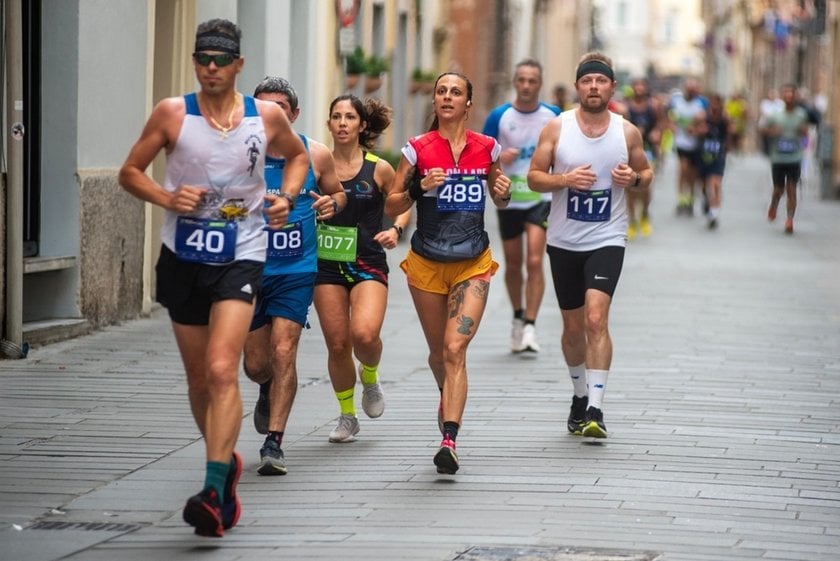
Creative Motion Blur with Panning
Motion blur can be an intentional effect. Panning is the best example. Moving the camera with your subject at a slow shutter speed keeps the subject relatively sharp while it blurs the background. Start with 1/30 or 1/60 and match your movement to the subject’s speed. Practice keeping the subject centered to avoid unwanted blur.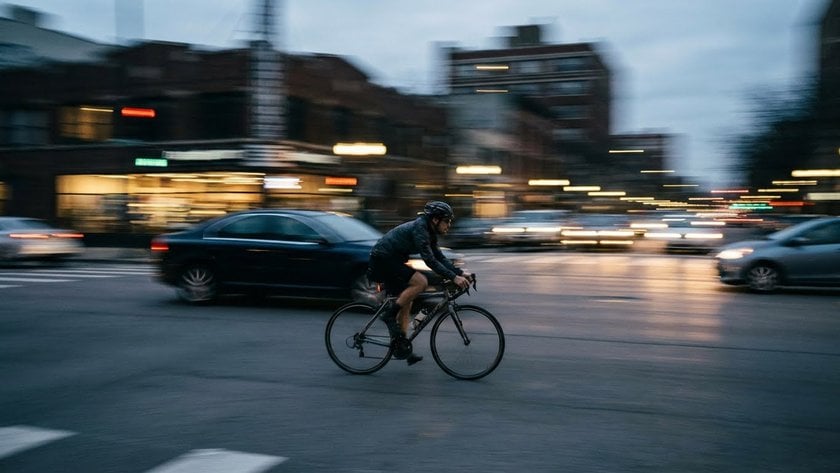
Using Long Exposures for Landscapes
Long shutter times create smooth water, soft sky streaks, and glowing light trails. For these scenes, use a tripod to keep the camera steady. Neutral density filters help you shoot multi-second exposures during the day without overexposing. Once you capture the shot, you can refine brightness and contrast in editing. If you need gentle, natural improvement, tools that enhance photo can bring out detail without making the image look artificial.
Managing Camera Shake
 The length of exposure affects sharpness even when nothing in the scene moves. Slow settings can introduce blur from small hand movements or wind. Faster exposure times reduce this risk. Image stabilization helps, but it only corrects camera shake, not subject motion. If your subject is moving, increase the exposure speed to keep it sharp.
Balancing Shutter Speed with ISO and Aperture
 The camera’s capture duration works together with ISO and aperture. If you shorten the exposure, you may need to raise the ISO, which adds noise. If you open the aperture to compensate, the depth of field becomes shallower. Think of the three settings as a team that must work together to support the look you want. Adjust them in small steps while watching how each change affects your final image.
Troubleshooting: When Your Shutter Speed Isn’t Working
 Problems in your camera’s capture duration normally manifest as blur, dark frames, or unexpected results. Here’s how to troubleshoot them step by step.
Fixing Unwanted Blur
If your images look blurry, start with three checks: focus, shutter speed, and camera support. Make sure your focus mode matches the scene. If the shutter is too slow, raise it and increase ISO if you must. When possible, stabilize the camera with a tripod or a firm surface.
Dealing With Motion You Didn’t Expect
Sometimes motion blur appears even when you think your exposure time is fast enough. In these cases, look at the subject’s speed. Fast sports and active kids need much quicker exposures than calm portraits. To freeze a child running, start at 1/500 or faster. If you want a gentle blur instead, slow the exposure and hold the camera steady.
Correcting Dark Images at High Shutter Speeds
Fast shutter speeds reduce the amount of light hitting the sensor. If your photos turn out too dark, open the aperture or increase the ISO. If ISO becomes too noisy, consider using a brighter lens or adding more light. For still scenes, another solution is switching to a tripod and using a slower shutter without risking blur.
When Auto Modes Behave Strangely
Auto and semi-auto modes may restrict the range of capture speeds available. If the camera won’t choose the timing you want, switch to manual or shutter priority mode. Shutter priority lets you set the exposure length while the camera handles aperture. Manual mode gives complete control over both. If results still seem off, review your firmware and menu settings, since some cameras adjust or limit speeds automatically.
Some models apply limits in certain modes or adjust RAW files in ways you might not expect. For iPhone users, this also applies; if you want to experiment with slow shutter shots, guides on how to take long exposure photos on iPhone can help you achieve smooth, creative results.
Flash Sync Problems
If you use flash, check the maximum sync speed of your camera. Shooting faster than that limit creates black bands across the frame because the shutter can’t fully expose the sensor during the flash burst. Use high-speed sync or slow down the shutter to stay within the safe range. Checking the flash manual helps you avoid this issue in mixed-light situations.
AI-Powered Image Enhancer for Flawless Portraits
Give it a try!Last Words
Shutter speed is a compact tool with big creative power. Start with a beginner shutter speed chart, test the steps, and practice panning and long exposures. Keep a simple checklist when you shoot and adjust ISO and aperture as needed. With steady practice, you will pick exposure times with confidence and purpose. Remember, mastering this timing control doesn’t just improve technical skill. It gives your photos energy, mood, and storytelling power that can truly set your work apart. Every click becomes a chance to create exactly the image you imagined.