Best Way To Share Wedding Photos Instantly And Easily
January 22, 2026

The photos of the wedding are a sort of time travel in the sense that you can always put yourself in the adorable memories and feelings even years after the time it was taken. But like all commodities, pictures demand special handling to maintain the original quality and integrity of the picture.
Storing physical photos, coating them with special compounds, or even saving digital copies to a separate flash drive are all methods that have long since become obsolete. They have proven their effectiveness, but in today's world, we are less likely to be tied to one place, which makes transporting albums inconvenient. Digital copies can be stored or sent incorrectly, which also affects the display of colors and details.
The modern approach involves using ways to share wedding photos that provide stable access to the original images from anywhere, regardless of time. Luminar has this technology, providing photographers with a convenient tool for interacting with captured material and giving the bride and groom the ability to install any version of the image from the cloud.
How Luminar Web Gallery works
A wedding photo gallery should be practical and not tied to constantly changing factors. Luminar Web Gallery is built on this principle: publish one or more photos on the internet, create a link, and ensure convenient viewing on any device.
Create Unforgettable Wedding Memories with AI Editing Tools
Try Luminar Neo Today!Using messengers or other applications to send images means accepting a result in which the photo's quality is compromised, colors fade, and details become blurred. A digital gallery involves storing pictures in a cloud service, eliminating the limitations of third-party file-sharing services. You or your relative living on the other side of the globe can view photos in their original quality with just a few clicks. So why give it up?
Creating An Online Gallery
Earlier, we looked at what cloud storage is and why it is more effective than traditional methods. Now let's figure out how to create an online gallery for clients. Luminar understands its customers very well, so the process of creating a shared storage space boils down to four simple steps:
Upload photos. First, you need to add the photos you want to share to the system. You can upload them through a separate section on the website or by dragging and dropping the files into a special area.
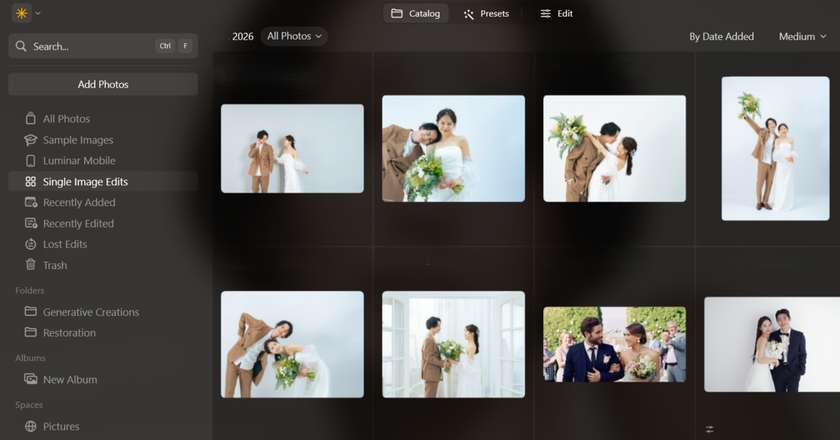
Select photos. If the pictures were added correctly, the catalog will be updated automatically. Select the photos you want to share: one or a major.
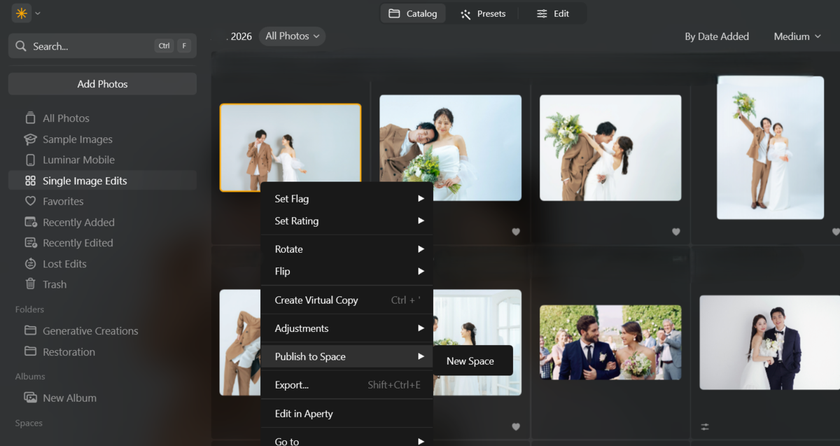
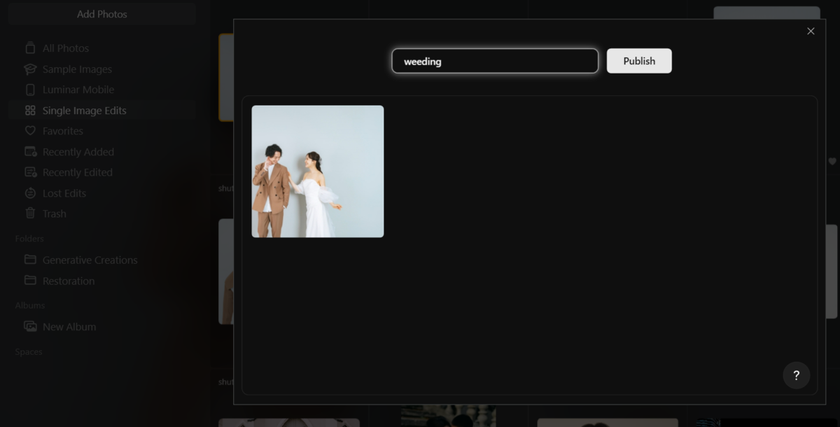
Use the Spaces tool. After selecting the appropriate photos, select “Luminar Spaces” and then “Create Online Gallery.” Publish the images after selecting a name and setting the initial parameters.
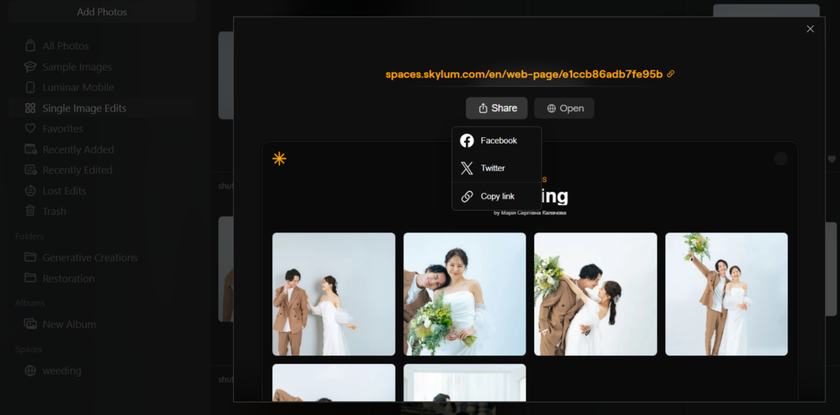
Share the link. Once you have finished adding images to the cloud environment, you will also receive a unique URL that you can send to friends or clients.
If needed, you can edit photos automatically or manually to remove defects, replace objects, or adjust contrast. Everything is available in one place—no Photoshop or other editors are required.
Transform Your Photos into Classic Monochrome
Try it in Luminar NeoDelivery Control: Downloads, Privacy, and Album Access
 Maximum speed and quality preservation will not be the priority when it involves sharing wedding photos. In a wedding album, there will be photos of all the stages of the event, and hence, many of them will be too personal to share with the rest of the population. The control of delivery decides who will view all the published photos, and who will only view some of them. It will prevent embarrassing or awkward situations when someone knows too much.
You can be wary of the security of your memories in one compartment, no longer worrying whether you have lost your phone/flash disk containing photographs or forget to take back the physical album. For this reason, cloud storage is the best way to share wedding photos with guests, friends, and relatives. A good setting helps keep your personal space and comfort intact without any undue pressure and the need to make up stories.
Quick and Consistent Editing Before Publication
 The ability to edit uploaded photos is at the heart of Luminar Neo. Photographers and recipients don't need to switch to third-party applications if they want to edit a finished image. What's more, changes can be saved as a separate version of the original photo, keeping two or more versions at the same time, with the ability to access them at any time.
Luminar can also be called the best way to send wedding photos because it provides access to a “batch processing” service. That is, when you desire your photos to have no differences in style or mood, you can get that outcome with a several clicks. The only thing you have to do is edit one wedding photo and save the settings as a preset.
It is possible to edit manually or use the AI assistant to do the routine work. It could be the removal of an object, colorization, or replacing the sky, background, etc., but the outcome will be commendable. And in case some elements appear unnecessary, then they can always be selectively removed with the help of an advanced layer system.
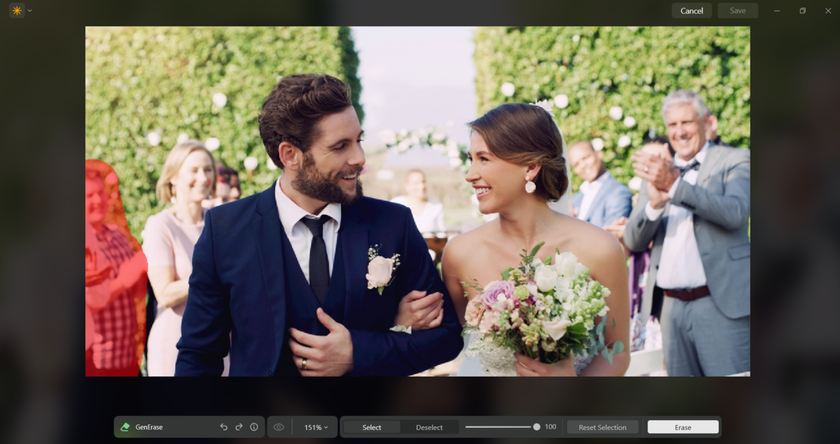
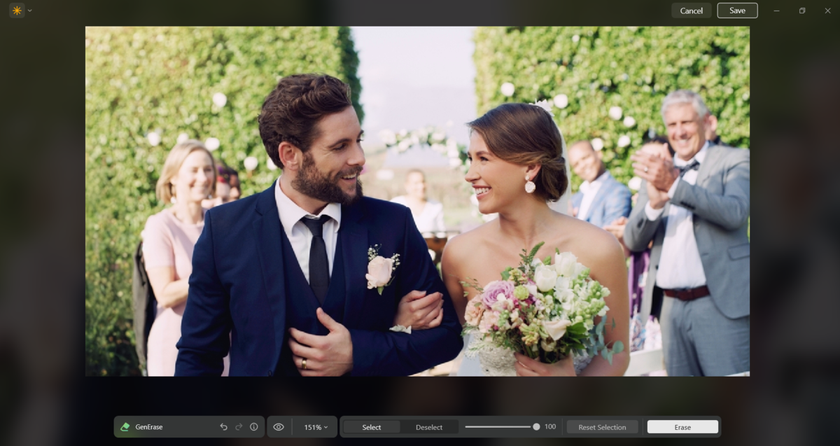
Removing Objects From The Scene
Cases are such that a good shot may be spoiled due to a single minute thing. A lady in the background who was old, something that tumbled into the picture, or even unbecoming lighting. However, this is no reason to abandon the scene! Perfect the scene with a few tools and adjustments.
Tools that enable you to remove people from images automatically detect boundaries, so you don't have to spend time on routine tasks. Pay attention to those processes that you can only do. It is the best option to work with Luminar since, in that way, you can empower the AI assistant to the maximum.
Applying Filters
Filters can help wedding edits look consistent, but when they are handled as a finishing step. The safest workflow is to correct the photo first. Set white balance, exposure, and contrast so the dress stays white and skin stays natural in the same lighting.  After that, a filter can bring the set into the same “family” of color. When a heavy look goes on too early, it usually creates the same problems every time: orange faces under warm bulbs, gray whites, and banding in smooth areas like cheeks and skies.
 A beauty filter is best used on portraits and close-ups, not across the whole gallery. Start with a low strength and build slowly. Many wedding files look realistic in the 5-20% range, then get artificial past that point, especially on high-resolution cameras. Apply it with a mask or brush so it hits cheeks and forehead, then back off around eyes, eyebrows, lips, hairline, and beard stubble. Those edges give the face shape, and over-smoothing there is what makes people look “edited.”
 A quick quality check keeps this step honest. Zoom to 100% for skin texture, then zoom out to fit-to-screen to see whether the face still matches the scene. Look for three red flags: pore texture turning into blur, makeup losing detail, and skin tone shifting compared to hands or neck. If any of those show up, lower the strength or narrow the mask. It will be quicker than repairing the complaints afterwards, and will leave the entire album with the ceremony daylight through the reception lighting.
Working With Presets
Presets are also helpful to use in editing, yet their mechanics are complicated than they may appear initially. The templates, which are offered in the Luminar library, cannot be applied to all the wedding photos, and paying attention to the details is worth being attentive a bit before making the changes.
Make sure that color correction does not kill all the “life” in the scene. Tones should not be too gray, nor should they be too saturated. In order to get a movie-quality image, it is worth finding a balance and starting from the scene. Church and indoor ceremonies usually have dark, humid lighting conditions, and therefore, presets must be used working with presets with caution to brighten the light, without over-illuminating the dress or obscuring details of dark suits. Outdoor ceremonies are held in the sunshine or shadow, and in the shadowy places, the aggressive contrast generally obscures the features and causes highlights to be clipped.
The inconsistency of the images becomes apparent when the album is published, because viewers quickly flip through the photos and compare the frames with each other. When the color and brightness change dramatically from photo to photo, even a well-shot wedding album can look uneven, which is exactly what the best photo sharing for weddings tries to avoid.
The solution to this is to have a limited number of presets whose roles are well defined and to use them as a starting point and not as a final output. Once a preset has been used, the fastest method of staying consistent in a set is to change the exposure and the white balance of the scenes. As these two parameters are changed, the gallery becomes seen as one narrative as opposed to a collection of disjointed edits.
Comprehensive Photo Processing
When there is a wedding being shot, the lighting and other surroundings will be dynamic, and as such, the end product will definitely have varying styles. In case this is not an issue, the simplest improvement will be enough. But when the customer prefers to have hundreds of photos processed in the same manner, the photographer will be forced to lose sleep in the coming days.
The batch processing would help the specialist to evade this misery of their work, performing the routine part of the work. The process has only three stages: the initial image was thoughtfully processed manually, the style was applied to other paintings, and isolated edits were made.
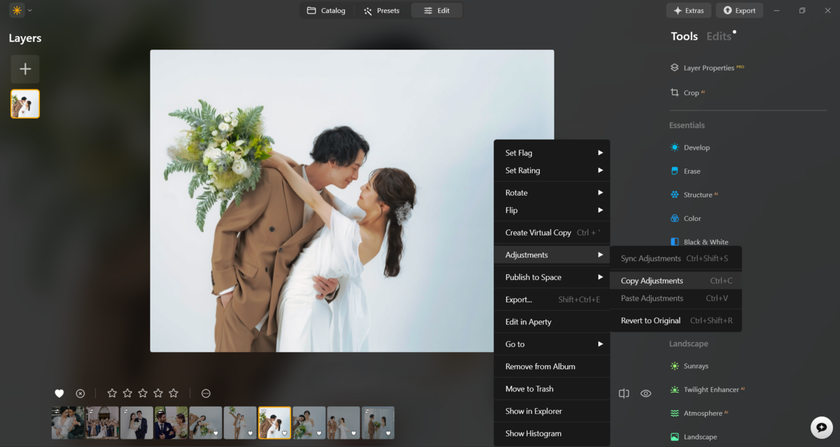
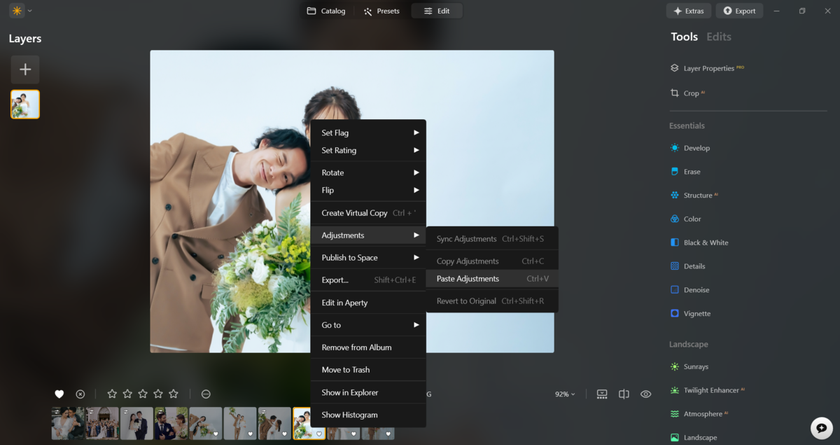
In this context, the best editing software for high-volume wedding shoots is one that maintains speed without compromising quality. Of course, a preset will never suit all the photos, and that is when all one will be able to do is move sliders manually and make a certain file prettier.
Capturing Precious Moments: Why You Should Trust Luminar
Trust comes from results. Couples want a gallery that feels curated, guests want a link that opens instantly, and photographers want delivery that looks professional and cuts follow-up requests. A web gallery keeps everything in one place with stable access and a clear album structure, so sharing stays predictable from previews to finals. That is why Luminar can work as the best wedding photo sharing app for wedding delivery workflows: it supports a clean presentation, practical sharing controls, and a smooth editing-to-gallery path.