Luminar 4
Use Luminar 4 for free for 7 days.


Time to get creative with that 500px Quest. Luminar and 500px are partnering to elevate your creativity. Luminar 4 is a smart photo editor based on Artificial Intelligence. This award-winning software is packed full of fast and intuitive tools that let you easily create fantastic images. Download 30-day FREE version of Luminar 4. No subscription or credit card needed.

Buy Now
No Subscription.
30 Days Money Back.
If you need additional help or have questions, feel free to contact Skylum's friendly Support Team at skylum.com/support

Thank you for downloading
Luminar 4
Preparing your download...
Did your download not start?
Dont worry, just click here
to try again.
Oops! Something went wrong. Don't worry, just click here to try again.
 .NET Framework
Step 1
Run the
Luminar 4 installer
Click the downloaded file at the
bottom left corner of your screen

Step 2
Step 2
Follow the instructions
to install Luminar

Step 3
Step 3
Enjoy new photo
editing experience
Thank you for downloading
Luminar 4
Preparing your download...
Did your download not start?
Dont worry, just click here
to try again.
Oops! Something went wrong. Don't worry, just click here to try again.
 .NET Framework
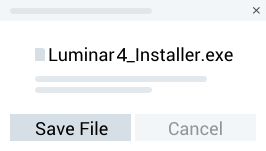
Step 1
Run the
Luminar 4 installer
Click the downloaded file at the
bottom left corner of your screen
Step 2
Step 2
Follow the instructions
to install Luminar
Step 3
Step 3
Enjoy new photo
editing experience
Thank you for downloading
Luminar 4
Preparing your download...
Did your download not start?
Dont worry, just click here
to try again.
Oops! Something went wrong. Don't worry, just click here to try again.
 .NET Framework
Step 1
Run the
Luminar 4 installer
Click the downloaded file at the
bottom left corner of your screen

Step 2
Step 2
Follow the instructions
to install Luminar
Step 3
Step 3
Enjoy new photo
editing experience
Thank you for downloading
Luminar 4
Preparing your download...
Did your download not start?
Dont worry, just click here
to try again.
Oops! Something went wrong. Don't worry, just click here to try again.
.NET FrameworkStep 1
Run the
Luminar 4 installer
Click the downloaded file at the
bottom left corner of your screen
Step 2
Step 2
Follow the instructions
to install Luminar
Step 3
Step 3
Enjoy new photo
editing experience