

Intensify vs Luminar: Which Photo Editor is Right for You
Intensify Pro has been a go-to for quick color enhancement, but it’s starting to feel a bit limited, isn’t it? If you’re here, you’re probably looking to up your photo editing game. That’s why we’re thrilled to introduce you to Luminar—the powerful next step beyond Intensify Pro
View plansWhy Choose Luminar for Photo Editing in 2024
Advanced Tools for Photo Correction
Luminar goes beyond basic color correction by offering a wide range of presets that let you apply professional-grade edits with just a few clicks. Plus, it recently introduced a unique Color Transfer feature, allowing you to seamlessly apply the colors from any image to your own for a creative edge.
.webp)
Extended AI Editing Features
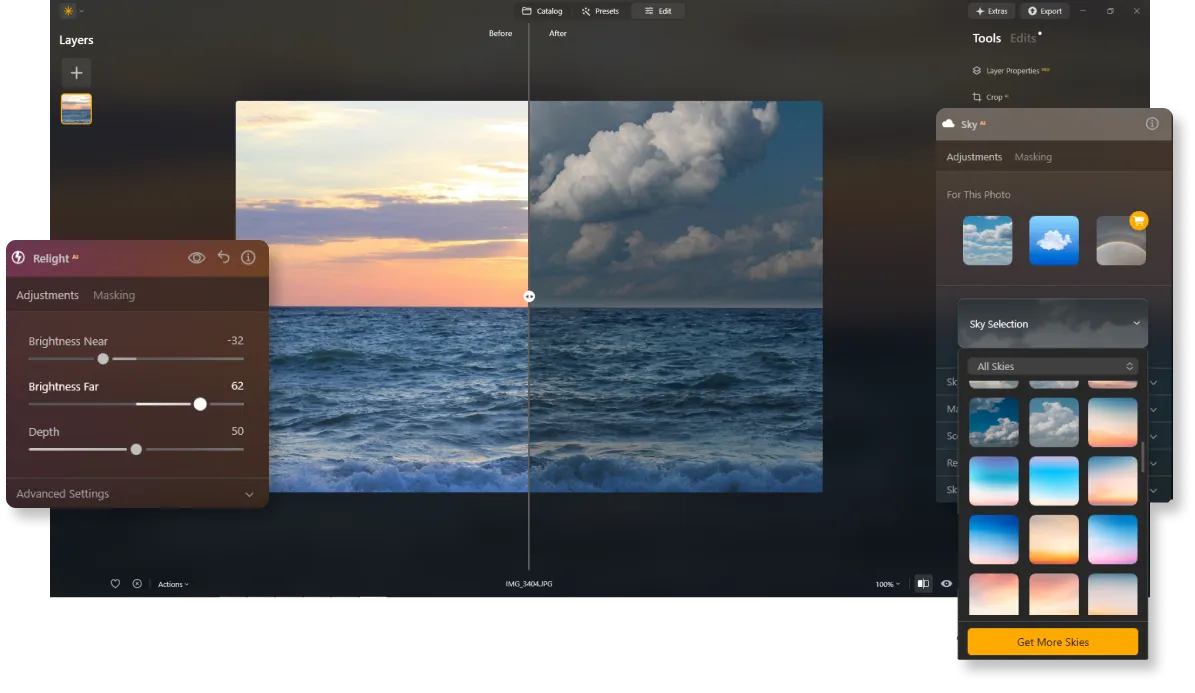
Luminar isn't just about color correction; it’s packed with AI tools like the popular Sky Replacement and Relight AI features. On top of that, it offers generative tools such as photo expander and object replacement, opening up endless creative possibilities.
Constant Updates and Improvements
Unlike Intensify Pro, Luminar is constantly updated with the latest technology, ensuring you always have cutting-edge tools at your fingertips. It’s also fully compatible with the newest cameras and laptops, so you won’t be stuck with unedited photos just because you upgraded your gear.


Intensify vs Luminar: A Brief Overview of Key Differences
| Aspect | Intensify | Luminar |
|---|---|---|
Catalog (Library) |  |  |
AI-Powered Features | | |
Generative Tools | | |
Pro Tools | | |
Layers | | |
Support with Mobile Assistant (Luminar Share) | | |
Native Support for ARM and Apple M Processor | | |
Works as Lightroom and Photoshop Plugin | | |
Aurora HDR
Luminar
Single image tone mapping
Single bracket HDR merge
Batch Processing
Auto batch processing detection
Improved HDR brackets detection in Batch Processing
New Cameras Support
Batch file naming and export quality settings
Export presets saving
Up to ~1.5x-1.8x faster on different OS
Wide functionality



.webp)

Keep your workflow, expand your possibilities
Want to get all the benefits of Luminar but have an established Lightroom workflow? Great news! You can use all the power of Luminar within a plugin for Lightroom without changing up your usual post-production process.

An application & plugin
For macOS & Windows
- High-performance AI editor
24/7 technical support
30-day money back guarantee
Join our communities

